
CRA conformity assessment for mobile apps: which route applies
Most apps self-assess under the CRA. Authenticators, password managers, browsers, VPN clients and some device apps are class I and may need a notified body.
Most mobile apps can self-assess under the Cyber Resilience Act (CRA). The exceptions are apps whose main job is a security function the CRA names: authenticators, password managers, browsers, anti-malware and VPN clients. Apps that come with a smart lock or a health-monitoring wearable are in the same position. Until a harmonised standard covers them, most of these need a notified body.
TL;DR
- Covers: How your app’s core functionality sets its CRA category, which conformity assessment procedure each category can use from 11 December 2027, and what a notified body checks at each release if your app is class I.
- Not covered here: Whether the CRA applies to your app at all, or to an app already in the stores, is in does the CRA apply to my mobile app, and which tests to run and where their reports go is in OWASP MASTG for CRA compliance.
- First step: Write down your app’s one core functionality, check that your store listing, instructions and technical documentation describe it the same way, and find its row in the decision table below.
Reporting of exploited vulnerabilities and severe incidents already applies, but conformity assessment starts on 11 December 2027. From that date, before you put an app on the EU market, you have to show that it meets the essential requirements in Annex I of the CRA. On every route you write the technical documentation, sign an EU declaration of conformity and put the CE marking on that declaration or on the app’s website. The routes differ in who checks that work before you ship. If you can self-assess, nobody does. If you cannot, a notified body designated by a Member State first examines your app or approves the way you build it.
For some apps a harmonised standard removes that step. Once the Commission publishes the standard’s reference in the Official Journal of the EU, applying the standard lets you presume that your app meets the requirements it covers, and a class I app that applies it in full can self-assess.
What decides your app’s CRA category?
The CRA sorts products into four categories. Important products, split into class I and class II, are the product types listed in Annex III. Critical products are the types listed in Annex IV, and everything else falls in what the Commission’s guidance (C(2026) 5252, July 2026) calls the default category. Your app is important or critical only if its core functionality matches one of the listed types (Articles 7(1) and 8(1)). The CRA named each type in a few words and left the detail to the Commission, which wrote it in Implementing Regulation (EU) 2025/2392.
The CRA never defines core functionality. The term means the main features and capabilities without which the product could not do what it is for, as the guidance defines it. You can take your app’s core functionality from how you describe the app in its instructions, its store listing and its technical documentation, as long as that description matches what the app actually does. But you cannot play down a function to stay out of a category, and clear inconsistencies between those three documents are one sign that someone did.
Your technical documentation has to name one core functionality, and only one, so that a market surveillance authority can check you followed the right procedure.
Does a login, a password vault or an in-app browser change the category?
A product can perform the functions of a listed type and still have a different core functionality. The same holds for components: building a class I product into yours does not by itself make yours class I (Article 7(1)). Some examples in the implementing regulation could be mobile ones: a news app with an embedded browser is not a browser, although its maker still has to assess that browser’s security (recital 3), and a smartphone with a built-in password manager is not a password manager (recital 5).
Take a bank’s main app, with strong login, one-time codes and approval of card payments. I would keep it in the default category, because its core functionality is banking and the authentication serves it. Some banks, though, also publish a separate app that only generates codes or approves logins and payments for their other channels. That second app is a product of its own, and since its core functionality is authentication, I would put it in class I.
Extra features leave an app in its category. A password manager that adds breach alerts and secure notes is still a password manager. A module is different if customers can buy, license or subscribe to it separately, because that module is then a product with its own core functionality. A module that only ships inside your app is classified with the app. Take the security suite in the guidance’s Example 61, which also sells its security information and event management (SIEM) module as a separate subscription: that module goes through the class I procedure by itself.
Which mobile apps are class I?
Each important product type, in class I and in class II, has a description in Annex I of the implementing regulation, a different annex from the CRA’s Annex I. Five of the class I types can be the whole of an app on its own:
| Class I type (point) | What it covers |
|---|---|
| Identity management (point 1) | Products that provide authentication or authorisation, including access to physical locations. One-time password software, authentication software and multi-factor authentication software are named, so a standalone authenticator app belongs here |
| Browsers (point 2) | Standalone browser apps, and also embedded browsers “intended for integration into another system or application” |
| Password managers (point 3) | Products that store passwords on the device or on a server, including generating them, sharing them and filling them into other apps |
| Anti-malware (point 4) | Software that searches for, removes or quarantines malicious software on a device |
| VPN products (point 5) | Products that build an encrypted logical tunnel across a network, VPN clients included |
As I read point 2, its second half, on embedded browsers, is aimed at whoever sells the browser component rather than at the app that builds it in.
The other class I types reach apps through devices:
- smart home virtual assistants (point 16);
- smart home security products such as locks, cameras, baby monitors and alarms (point 17), together with the “hardware and software that centrally control such products”;
- connected toys that talk, film or track location (point 18);
- wearables that monitor health without being medical devices, or that are meant for children under 14 (point 19);
- routers, modems and switches (point 12), which matters for the app a router maker ships to set up its devices.
The guidance’s Example 9 is a wearable that measures heart rate and activity, with an app from the same manufacturer to show the measurements and set the wearable up. Even though the app comes from an app store, the two form one product because they were designed to work together. If that wearable has a health monitoring purpose or is meant for children under 14, as point 19 requires, the whole product is class I and the app goes through the same procedure as the wearable. By contrast, a fitness app from another company that reads the phone’s sensors is not part of that product.
An app built to control locks, cameras or alarms from several brands has no hardware of its own. In my view it is still software that centrally controls those products, as point 17 puts it, and that makes it class I in its own right.
For me the hardest calls are under point 1. Take a gym app that books classes, tracks workouts and shows the code that opens the turnstile. I read it as default category: nobody sells it as one-time password or authentication software. It presents itself as a training app, and that is what it does. An app whose only job is to be the key to a door, on the other hand, is a stronger candidate for class I.
As a consumer, I am not fully comfortable with that reading, because the class follows how the app is presented more than how people use it. But a manufacturer may not play down a function to misrepresent the core functionality, and clear inconsistencies between promotional material, instructions and technical documentation give it away (point 143).
If the gym app’s turnstile code comes from the access control vendor’s SDK, that SDK is the class I product, and the gym’s part is due diligence on the SDK, as for any component it builds in (Article 13(5)).
Can a mobile app be class II or critical?
Class II covers hypervisors and container runtimes, firewalls, intrusion detection and prevention systems, and tamper-resistant chips. The rare mobile case is a firewall or host-based intrusion detection app, because class II names application firewalls and host-based intrusion detection and prevention systems (point 2).
Critical products are hardware: payment terminals and hardware security modules, smart meter gateways, smartcards and secure elements (Annex II of the implementing regulation). An app that keeps its keys in the phone’s secure element uses a critical product without becoming one, because the integration rule of Article 7(1) applies to critical products too, according to the guidance.
Which category and procedure fit your type of app?
Points refer to Annex I of Implementing Regulation 2025/2392. The last column is the procedure from 11 December 2027, and for the class I rows it assumes no harmonised standard has been cited by then. “Notified body” means that a notified body either examines the app (module B+C) or approves how you build it (module H), both explained below. Rows marked * are my reading rather than something the texts say outright. Find your type of app in the first column:
| Your app | Category | Why | Procedure |
|---|---|---|---|
| Retail, loyalty, marketplace, news, social, games | Default | Core functionality not on the Annex III or IV lists | Self-assessment |
| Banking app with login, one-time codes and payment approval inside | Default* | Core functionality is banking; authentication serves it | Self-assessment |
| Separate app that only generates codes or approves logins and payments | Class I*, point 1 | Its core functionality is authentication | Notified body |
| Authenticator app | Class I, point 1 | One-time password and authentication software are named in point 1 | Notified body |
| Gym or venue app that shows an entry code | Default* | Presented as, and working as, a training app; if the code comes from an access vendor’s SDK, that SDK is the class I product | Self-assessment |
| App whose only job is to be the credential for a door system | Strong class I candidate*, point 1 | Point 1 covers access to physical locations | Notified body |
| Password manager | Class I, point 3 | Stores, generates and fills passwords | Notified body |
| Browser app | Class I, point 2 | Standalone browsers are named in point 2 | Notified body |
| App with an in-app browser or WebView | Follows the app’s core functionality | Building in a browser does not make it a browser (recital 3) | Self-assessment, unless that core functionality is listed |
| Anti-malware app | Class I, point 4 | Searches for, removes or quarantines malware | Notified body |
| VPN client | Class I, point 5 | Sets up an encrypted tunnel | Notified body |
| App with a VPN feature inside | Follows the app’s core functionality | A VPN also sold on its own is a separate product (guidance point 145) | Self-assessment, unless that core functionality is listed |
| App the device maker provides for a router, smart lock, camera, alarm, baby monitor, connected toy, health wearable or children’s smartwatch | Class I, with the device (points 12 and 16 to 19) | Device and app form one product (Example 9) | Notified body, for device and app together |
| Third-party app that controls locks, cameras or alarms | Class I*, point 17 | Software that centrally controls those products | Notified body |
| Fitness app that does not come with the maker’s wearable | Default | Example 9 covers only the device maker’s own app | Self-assessment |
| Firewall or host intrusion detection app | Class II, point 2 | Application firewalls and host-based systems are named | Notified body |
Which procedure can each category use?
Each procedure is built from modules, that is, fixed sets of assessment steps (Article 32 and Annex VIII). Module A is the self-assessment. In module B a notified body examines the app, and in module C you declare that what you ship matches the examined app. In module H the notified body approves and audits how you design, build and test.
- Default: module A, or a stricter procedure if you choose one.
- Class I: module A if you apply in full a harmonised standard or a common specification, which the Commission can adopt when standards are missing. Otherwise, module B+C or module H. A European cybersecurity certificate at level “substantial”, under a scheme the Commission has named for the CRA, also takes the place of module B+C or H, though a third-party body issues it.
- Class II: module B+C, module H, or such a certificate.
- Critical: a European certificate where the Commission makes one mandatory for that type, otherwise the class II procedures (Article 32(4)).
- Free and open-source software in class I or II can self-assess too, as long as its technical documentation is public when it is placed on the market (Article 32(5)).
Can a class I app use a standard, a certificate or a notified body today?
When I checked on 2 November 2026, the Official Journal cited no harmonised standard under the CRA. The European standardisation bodies had until 30 October 2026 to adopt product-specific standards for identity management, browsers, password managers, anti-malware and VPN products, among others (standardisation request C(2025) 618, sent by the Commission in February 2025), but none of those standards had reached the Official Journal. Common specifications were missing too, and so was any certification scheme named under Article 27(9). So for now a class I app goes to a notified body.
The standards for each point of Annex I come later still, due on 30 October 2027, a few weeks before conformity assessment starts:
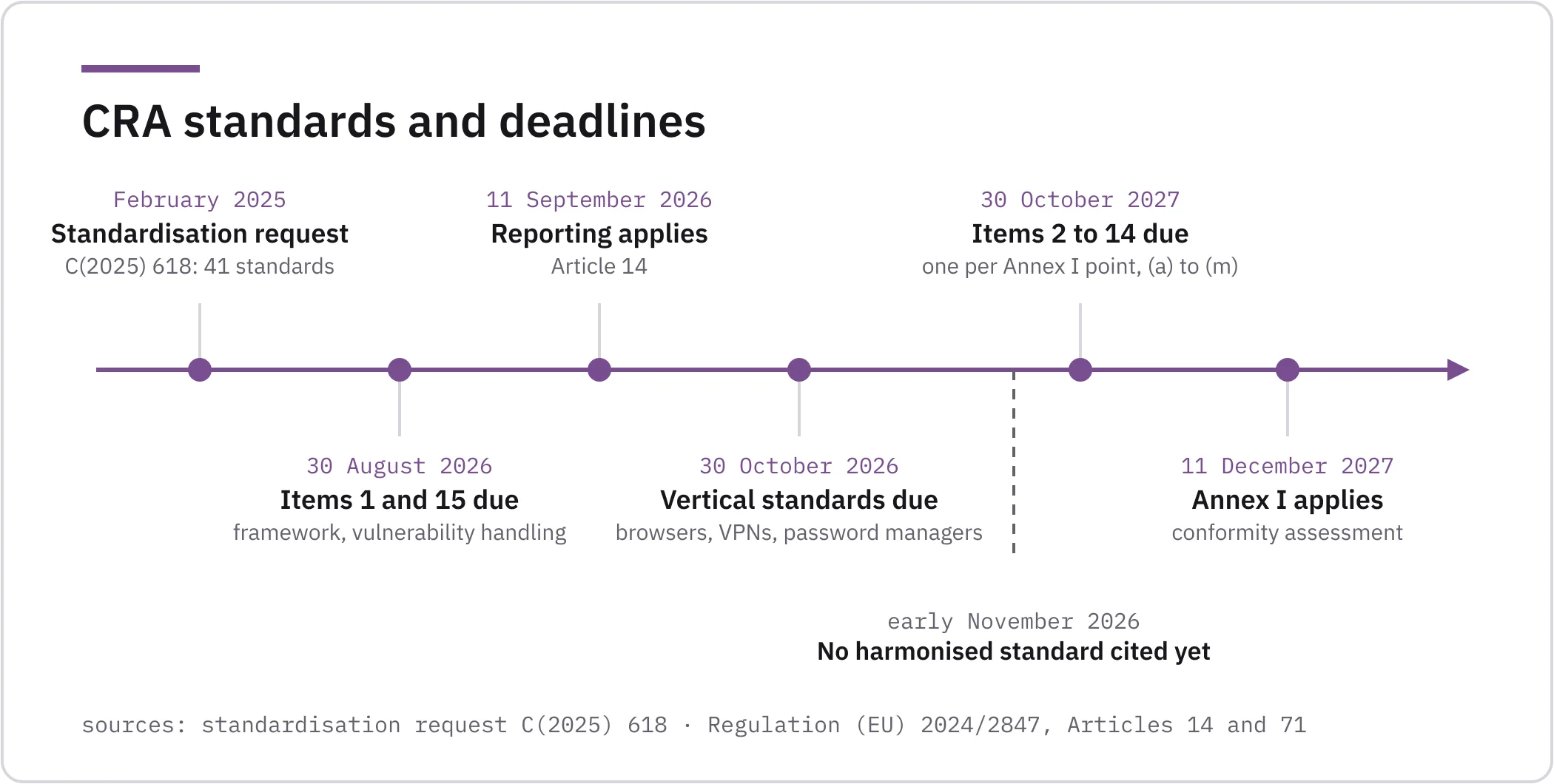
The CRA’s rules on notified bodies have applied since 11 June 2026 (Article 71), and Member States are to strive for enough of them by 11 December 2026 (Article 35(2)). But when I looked at NANDO, the Commission’s database of notified bodies, that same 2 November, it listed none for the CRA.
Once a standard is cited, self-assessing with it means applying all of it, and the standard’s scope has to cover at least every risk of your app’s core functionality, as the guidance explains. Anything else the app does, you cover by other means and document. The guidance’s example of this is an antivirus that also cleans disks and blocks tracking. Its maker applies the antivirus standard, deals with the two extras separately and can still self-assess the whole product.
If your app is class I, what does a notified body check at each release?
With module B you pick one notified body and send it your technical documentation, a risk analysis and the evidence behind your design and your vulnerability handling. That evidence can include test results from your own lab or from another lab working for you. The body examines all of it, and it also looks at the app itself and runs or commissions its own tests. If the app and your vulnerability handling meet Annex I, the body issues an EU-type examination certificate. Then, under module C, you declare that each release you ship matches the examined app.
Because the certificate covers the app as the body examined it, any change to the app or to your vulnerability handling that may affect conformity has to go back to the notified body, and each of those changes needs the body’s approval as an addition to the certificate. The body also audits your vulnerability handling from time to time.
In module H the notified body assesses your quality system. That system covers design, development, testing and vulnerability handling, and it says which tests you run, when and how often. The body audits the system on your premises and keeps auditing it. When you plan a change to the system, you tell the body, and the body decides whether the change needs a new assessment.
With module H, the body’s identification number also goes next to your CE marking (Article 30(4)).
Over a run of releases, the notified body steps in at different points: under module B+C at each change that may affect conformity, under module H when you change your quality system, and under both at its audits:
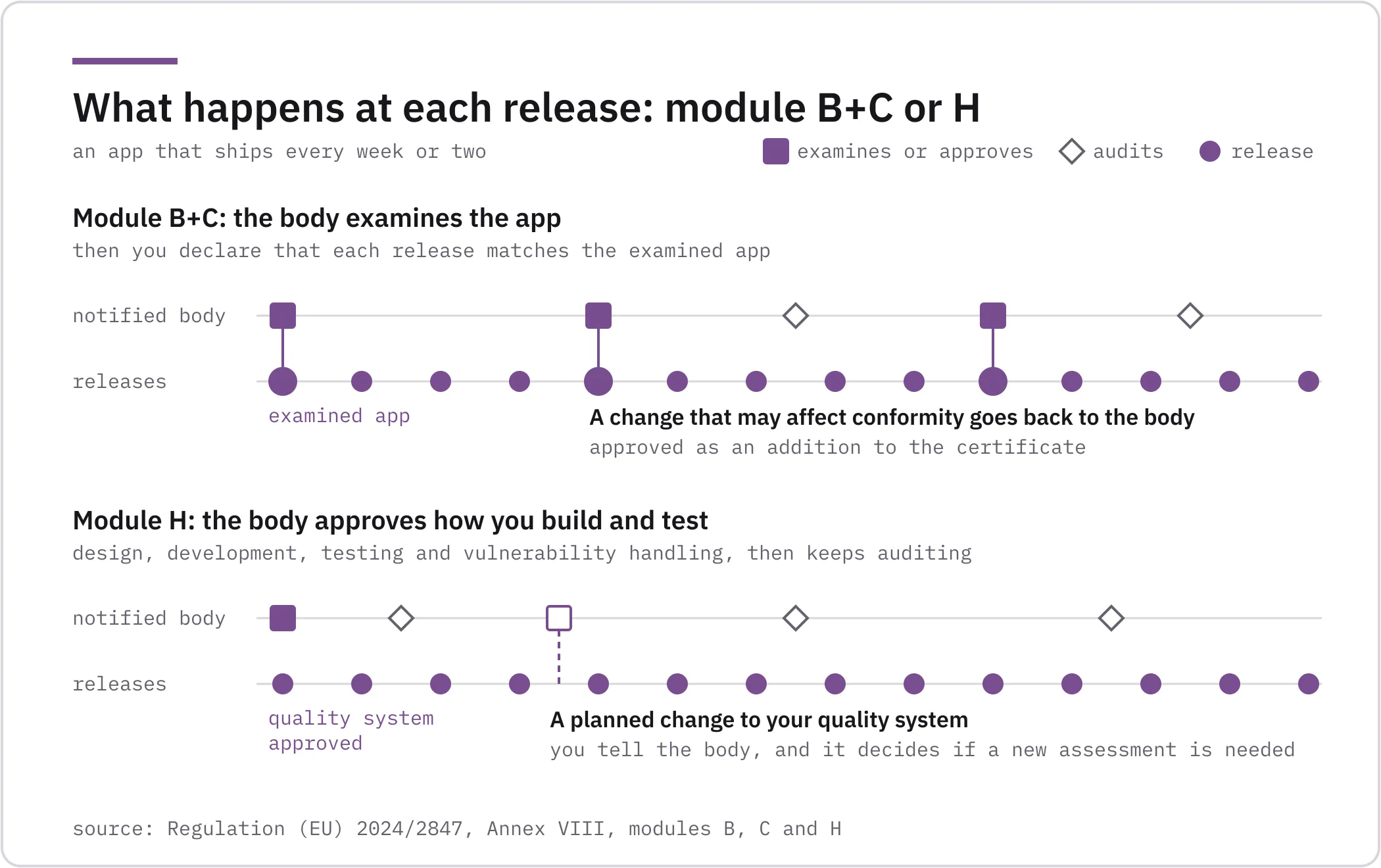
We test apps, and module B would give us more work, because every change that may affect conformity needs new evidence and producing it is our job. Even so, module H is the realistic route for an app that ships every week or two, because the notified body approves how you build and test and then audits that, instead of approving each change. For how to test every release of such an app, see Mobile app security testing in CI/CD.
In the Common Criteria world I worked in for years, the certified version of a product was often several releases behind the one customers were running, because a product changed many times within a single certification cycle. ISO/IEC TS 9569, published in November 2023, was our attempt to fix that. It adds patch management requirements so that developers can re-certify updated or patched versions consistently, and some laboratories already use it. In Spain, the National Cryptologic Centre (CCN) went further with CICLON, its March 2026 methodology for cloud products, which pairs an initial evaluation with periodic monitoring and plans for automating the evaluation work. That automation is where I would most like AI to help, to make continuous evaluation affordable for an app that ships every week.
Where do your test reports go?
In the default category, your test reports go into your own technical documentation, which must include the reports of the tests that verify conformity (Annex VII). Under module B they are part of the evidence you send the notified body, which still decides what to examine and test itself. Under module H they are the records the body audits against the tests your quality system promised.
For a default-category app, the reports sit in point 6 of the technical documentation, next to the risk assessment and the specifications you applied, and a market surveillance authority asks for the file and for your declaration of conformity:
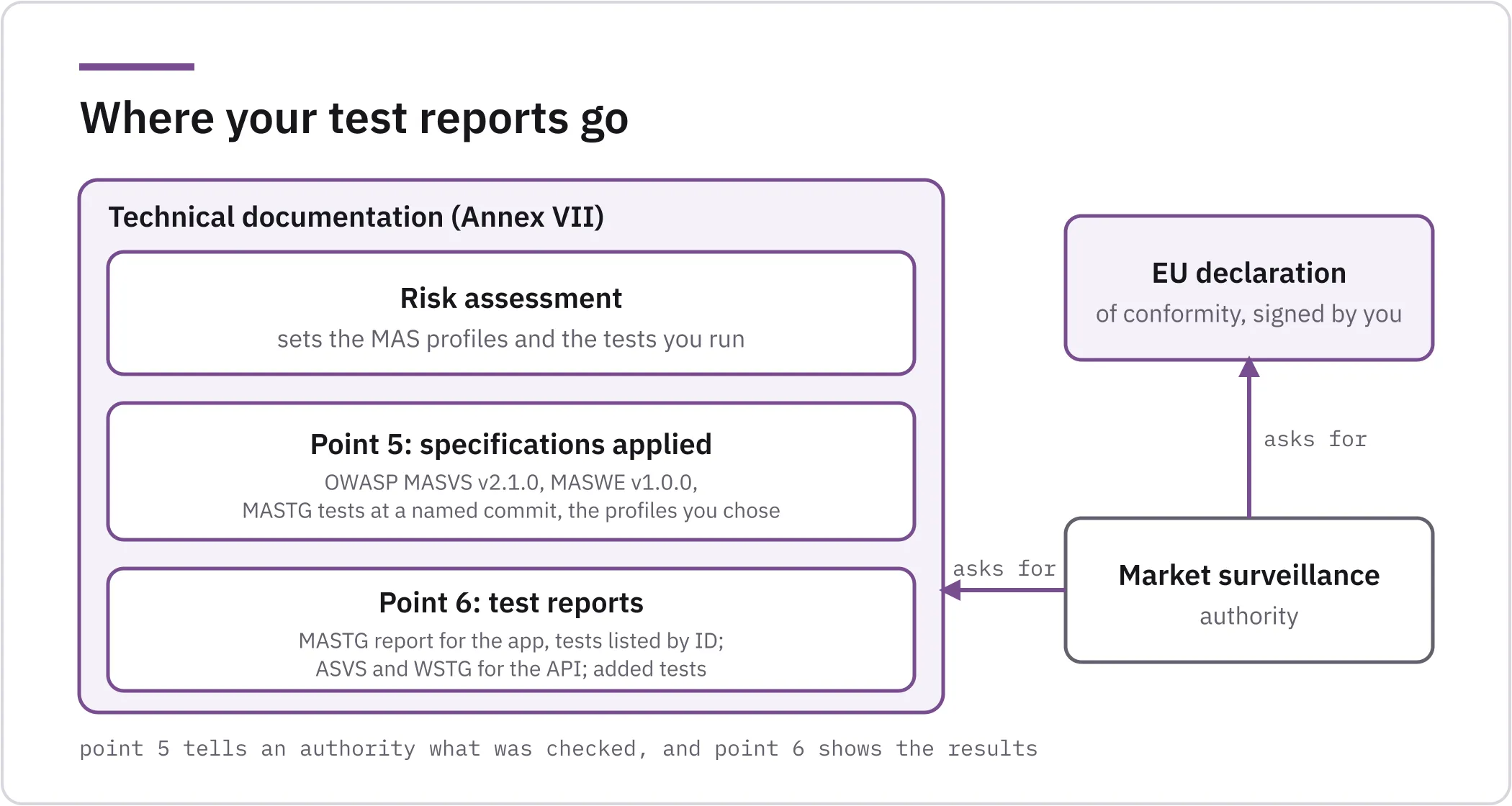
Our CRA testing for mobile apps produces those reports for the Android and iOS app and the backend interfaces it relies on, and points each result to the Annex I requirements it supports. The tests are mapped to OWASP MASVS v2.1.0 and the MASTG v2.0.0, as explained in OWASP MASTG for CRA compliance. For as long as you support the app, we test the releases we agree with you.
If your app is in the default category, as most are, tell us about your app. In a scoping call we look at what applies to it and which tests your technical documentation needs. If you need more support before testing, we can start with a consulting engagement.
If you are unsure which row of the table your app sits in, send us what your app does and how you describe it in the store, and we will look at its core functionality with you.
References
- Regulation (EU) 2024/2847 (Cyber Resilience Act), EUR-Lex
- Commission Implementing Regulation (EU) 2025/2392 on the technical description of important and critical products, EUR-Lex
- Commission guidance on the application of the Cyber Resilience Act, C(2026) 5252, Annex, European Commission
- Commission Implementing Decision C(2025) 618 on a standardisation request for the Cyber Resilience Act, European Commission
- NANDO, notified bodies by legislation, European Commission
- ISO/IEC TS 9569:2023, Patch Management Extension for the ISO/IEC 15408 series and ISO/IEC 18045, ISO
- CCN-STIC-2010, Metodología de Evaluación de Productos en la Nube (CICLON), March 2026, Centro Criptológico Nacional
- OWASP MASVS v2.1.0 (18 January 2024) and OWASP MASTG v2.0.0 (30 June 2026), OWASP