

Control the device, control the app.

Stop fighting root, emulator and hooking checks before every analysis. Chameleon's virtual Android and iOS devices pass them, and show everything the app does from the first minute.

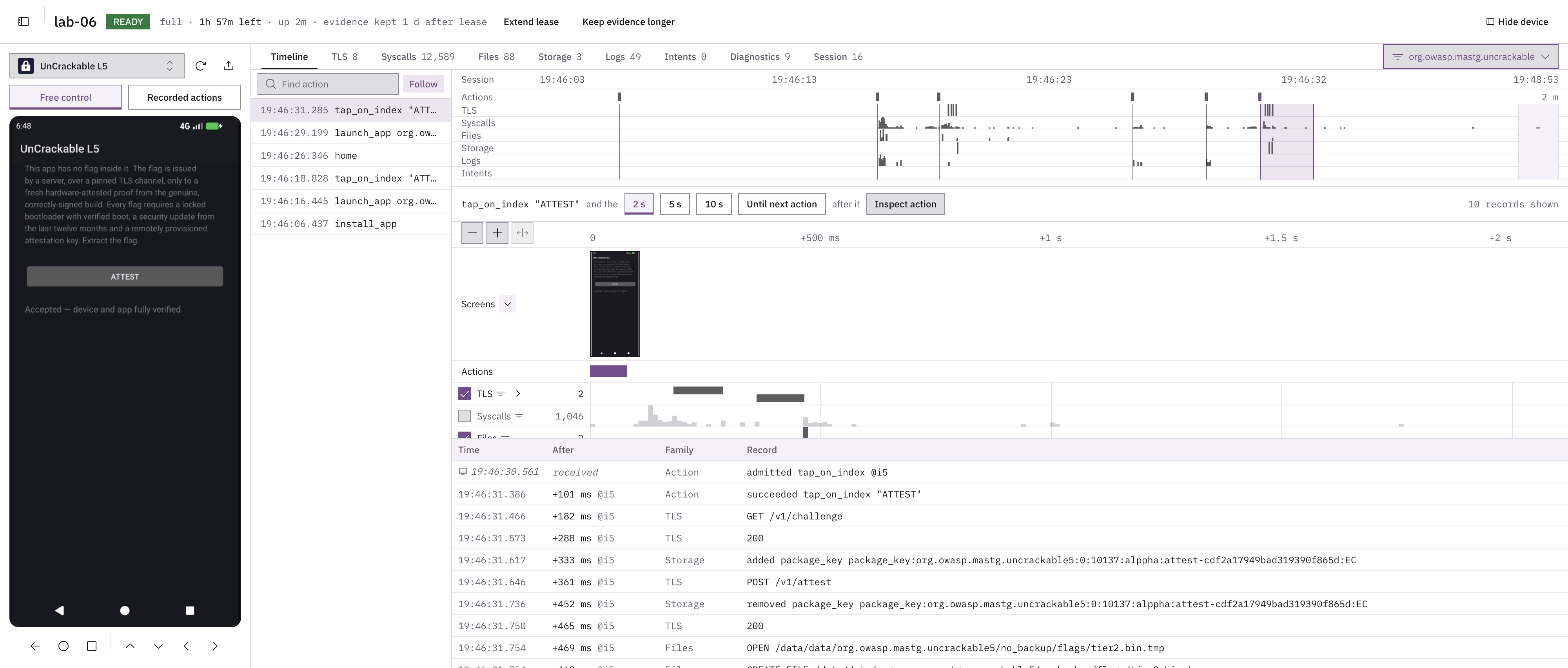
A Chameleon session in the web panel.

Each action, correlated with what the app did.

Chameleon web panel timeline: a live Android device, the recorded actions, the whole session on one timeline and the records that followed a tap on “Attest”.
  1. The device, live. Drive it from the browser, or let a script or an agent drive it.
  2. Every action on the device, recorded: taps, swipes, text and opening apps.
  3. The whole session on one timeline: actions, TLS, system calls, files, storage, logs and intents.
  4. Pick an action and see what the device did in the next 2, 5 or 10 seconds, or until the next action.
  5. Each record, with how long after the action it happened: here, the requests and files that followed the tap on “Attest”.

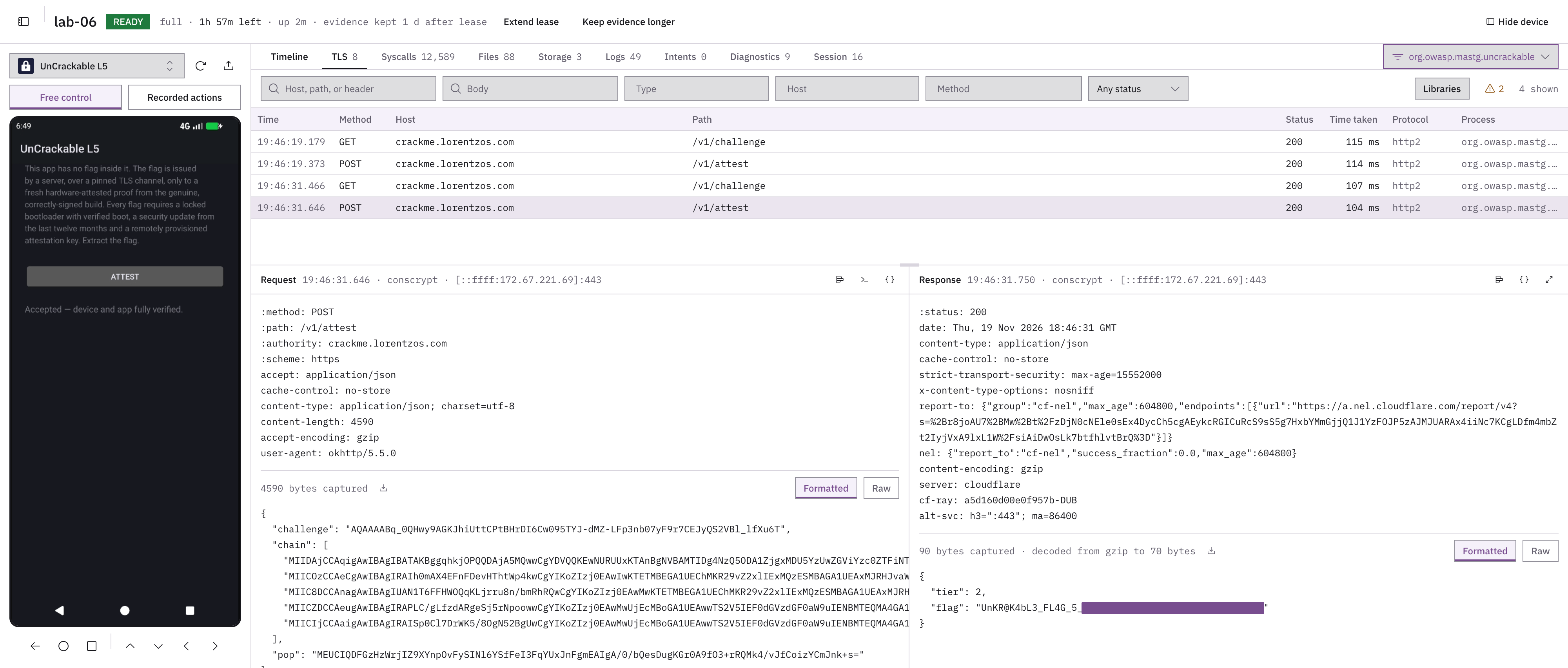
TLS in plain text, with no per-app scripts.

Chameleon web panel TLS view: the requests a test app sent to its server, and one request and its response in plain text.
  1. Each TLS request in plain text, searchable by host, path, header, body, method or status.
  2. The full request, and the TLS library it went through: BoringSSL, Flutter, Cronet, WebView and others.
  3. The full response, as the server sent it.

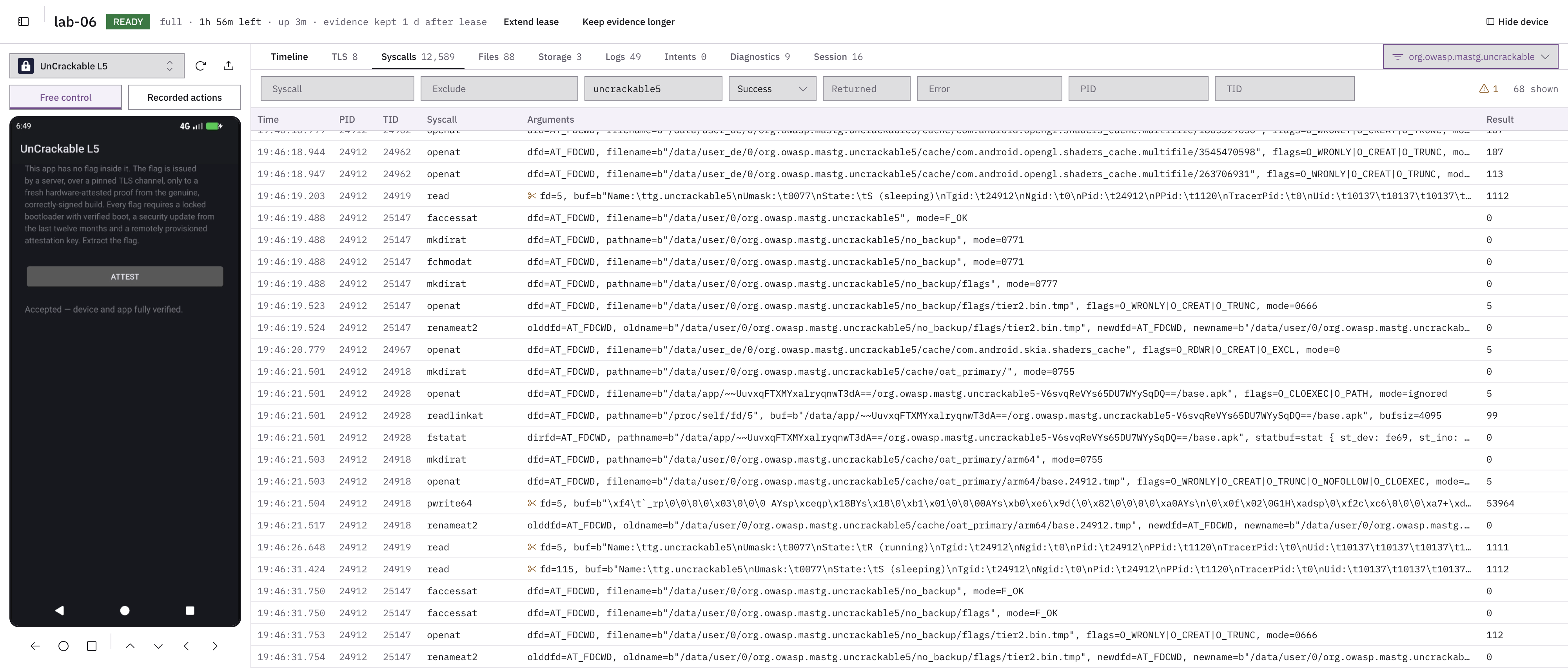
Every system call, with its arguments and result.

Chameleon web panel system calls view: the calls a test app made, with their arguments and results.
  1. Filter by system call, arguments, result, error, process or thread.
  2. Every system call the app makes, with its full arguments and result.
  3. The app reading its own process status, where debugger checks look for TracerPid.

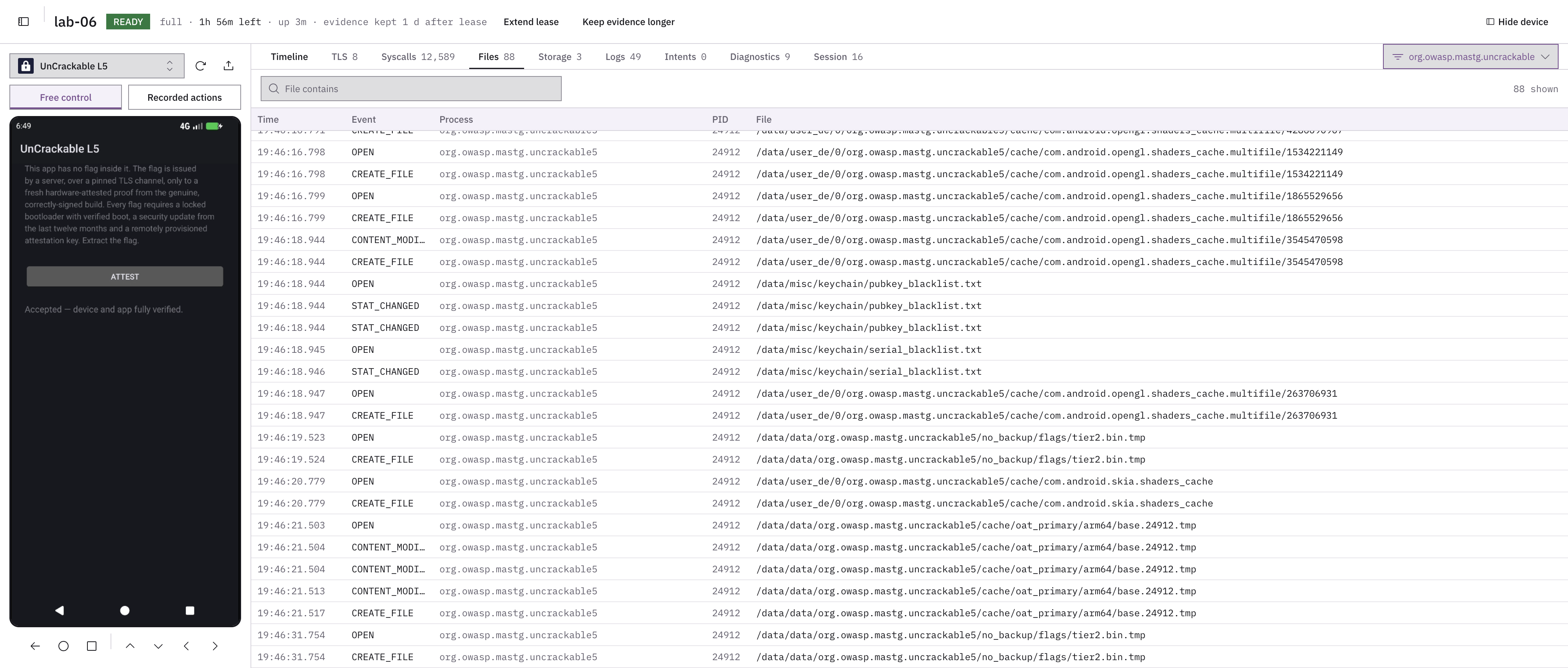
Every file the app touches, inside its folder and outside it.

Chameleon web panel files view: the files a test app opened, created and modified.
  1. Search by path.
  2. What happened to each file, and which process did it.
  3. The full path, inside the app's folder and outside it.

The keys the app creates, and when it removes them.

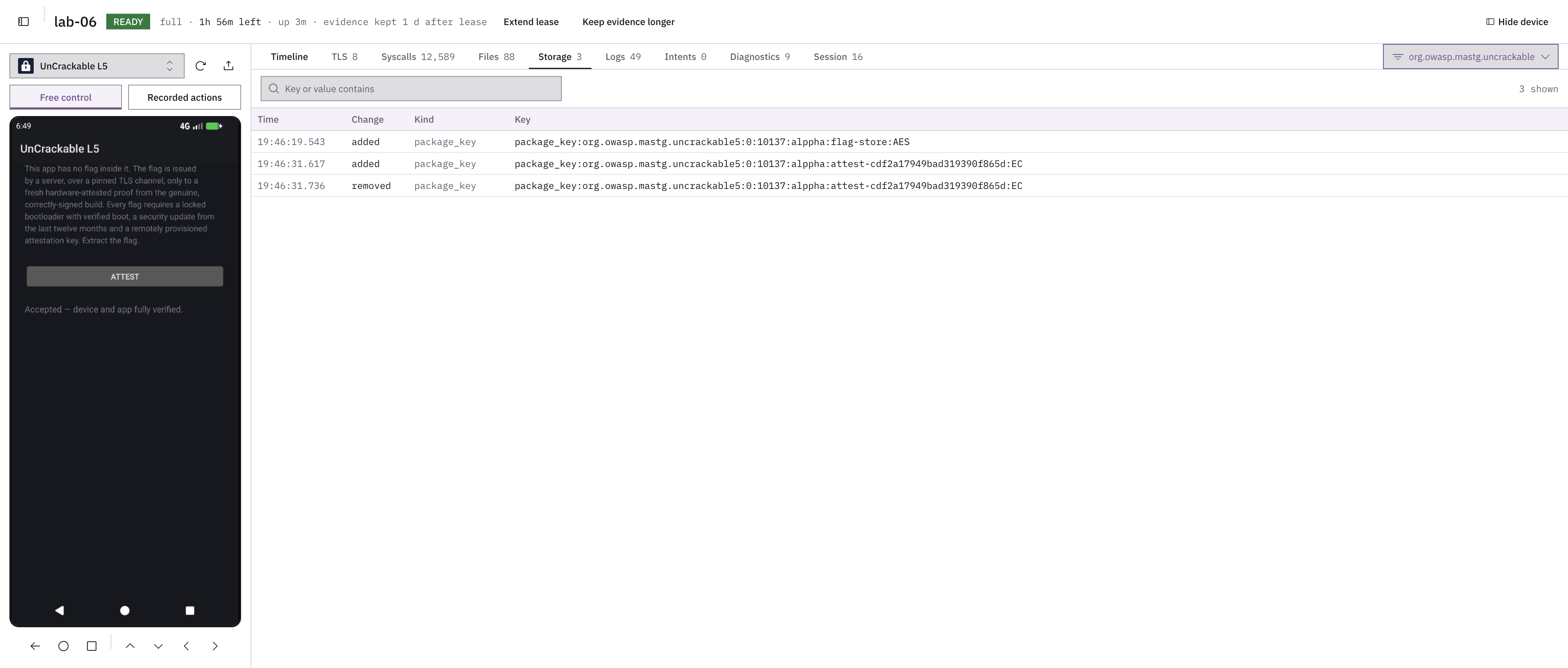
Chameleon web panel storage view: the keys a test app created and removed.
  1. What the app keeps on the device: here, the keys it creates, with their name and algorithm.
  2. When each one was added or removed.

The app's system log, searchable.

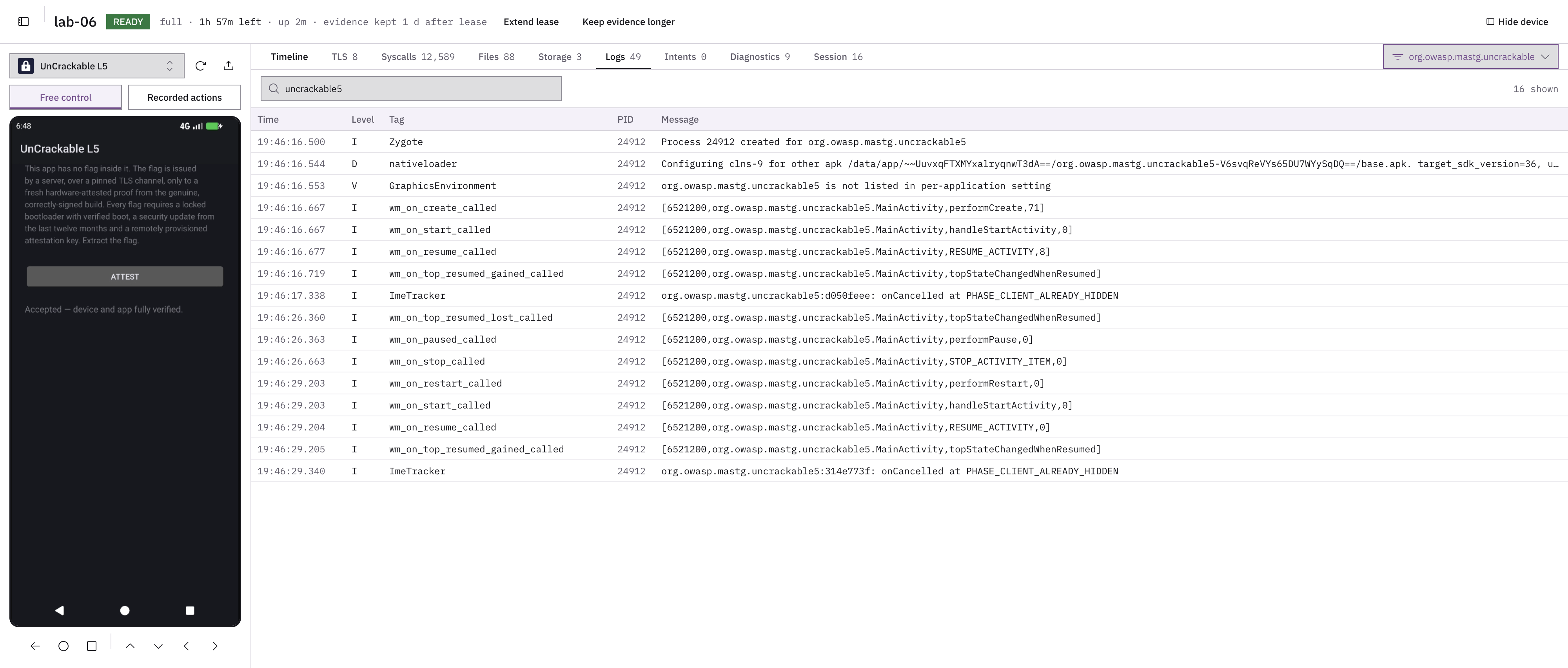
Chameleon web panel logs view: the system log lines for a test app.
  1. Search the messages.
  2. The system log for the app, as Android writes it.
  3. The level, tag and process of each line.

Many devices, each one ready in under 5 seconds.

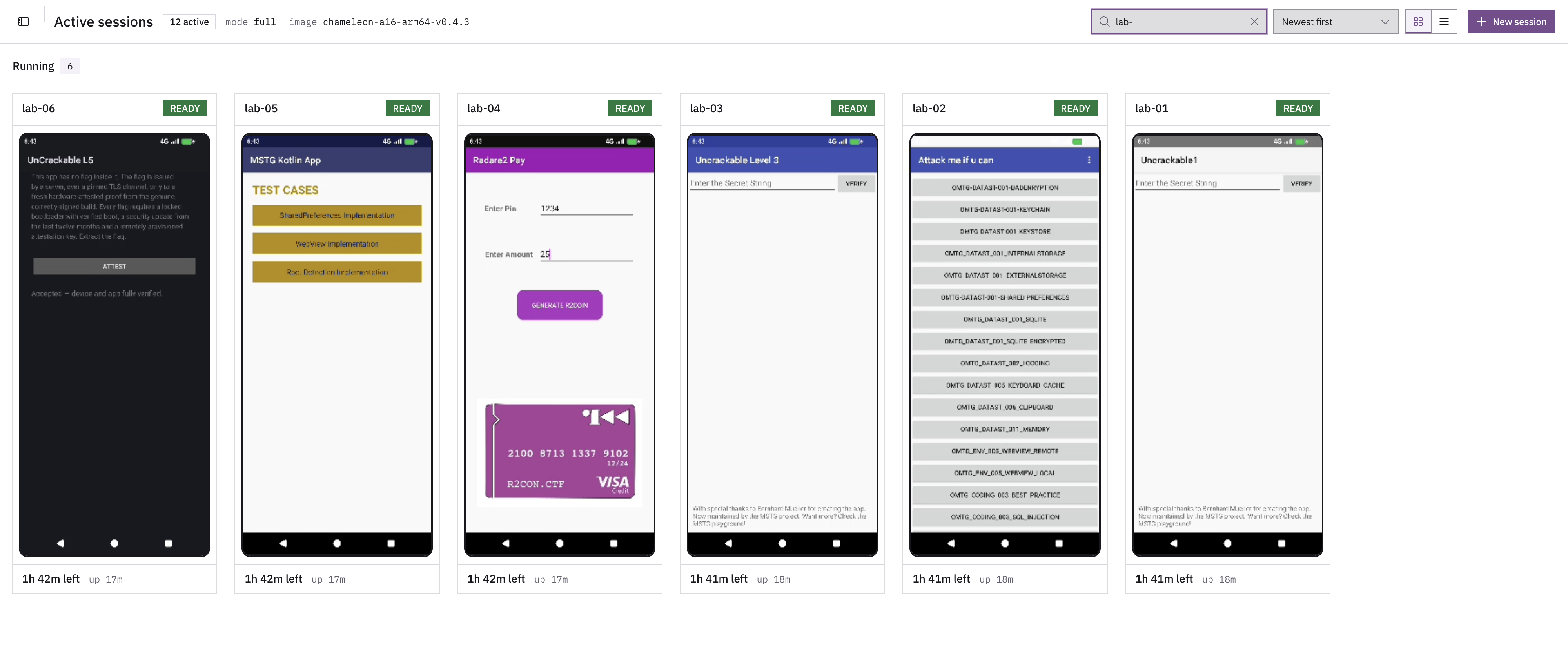
Chameleon web panel sessions view: six virtual Android devices running at once, each live with a different OWASP crackme or test app, with the time left on each and a button for a new session.
  1. Every device you have running, each one live: here, OWASP crackmes and test apps. Open any of them to see its session.
  2. How long each device has left, and how long it has been up.
  3. A new device in under 5 seconds, from here or through the API.

Apps cannot tell it from a real device.

Protections look for an emulator, root and hooking before they trust a device. On Chameleon they find none of them.

Virtualized ARM64, not emulated

Apps run their native ARM code on Android 16 or iOS 26, without the translation layer that protections look for.

Standard emulator

  1. App (ARM code)
  2. ARM to x86 translation
  3. Android on x86
  4. x86 server

Chameleon

  1. App (ARM code)
  2. Android or iOS on ARM64
  3. Virtualization
  4. ARM server

Emulator, root and hooking checks

Our patches get past them in commercial and open source RASPs, and we update them as protections change. On Android, the TEE can be simulated or hardware-backed.

What the app's protections see

  • Emulator checksNot detected
  • Root checksNot detected
  • Hooking checksNot detected

Apps that need hardware work too.

Biometric, payment and IoT apps need the device's hardware. The virtual device provides it, and these are two examples.

Camera

Inject a recorded video, a photo or a live feed from another camera.

Bluetooth

Connect the virtual device to real ones.

Scripts, AI agents and specialists.

Everything you can do on a device is available through an API and the command line, the same on Android and iOS. A script, an AI agent or a specialist drives the device the same way, and reads everything it observes.

# Ask for a device and install the app
$ vulnit mobile session create --platform android --name lab-06 --pool-default
$ vulnit mobile app install --session-name lab-06 UnCrackable-Level5.apk

# Open it and tap “Attest”
$ vulnit mobile action launch --session-name lab-06 --package org.owasp.mastg.uncrackable5
$ vulnit mobile action tap-index --session-name lab-06 5

# What did it send?
$ vulnit mobile evidence search --session-name lab-06 tls-traffic
$ 
  • SpecialistsDrive the device from the web panel, or attach Frida, lldb or a shell to it.
  • ScriptsRun the same steps on every build, through the API or the command line.
  • AI agentsDrive the device through the same API, and read everything it records.

Many devices, and evidence that stays.

Run many devices at once: how many depends only on the hardware you deploy Chameleon on. Give each agent or specialist one device or several, to run tests in parallel. Back up and restore an app's state to start every test from the same point.

  1. Clean deviceReady in under 5 seconds.
  2. AnalysisEvery action and what the app did, recorded.
  3. Device deletedThe device is gone.
  4. Evidence staysSearch it later, compare one build with the next or run the same analysis across many sessions.

For your security team

With our tooling service, your team can work with Chameleon in your own infrastructure, air-gapped networks included, and with tools we build for you.

Tell us what you need

A necessary cookie remembers your choices for up to 180 days. Privacy policy.