
Which MASVS profile does your app need: L1, L2, R or P?
Choose your MASVS profile, MAS-L1, L2, R or P, by who can attack your app. It sets which MASTG tests run, what you can claim and what a pentest adds.
A customer’s questionnaire asks whether your app meets “MASVS L2”. Whether L2 is the right target depends on who can attack the app. MAS-L1 assumes other apps on the phone, MAS-L2 a compromised operating system or someone else holding the device, and MAS-R the user. MAS-P covers personal data instead. The profile decides which tests run and what you can claim.
TL;DR
- Covers: How to choose among MAS-L1, L2, R and P by who can attack your app, which tests each profile adds, what you can claim after an assessment and when to add a pentest, with links to the Android tests.
- Not covered here: How the profiles map to the CRA, in the guide to OWASP MASTG for CRA compliance; and how to rate findings by severity, in Darío Abad’s mobile pentest findings: which are real and what to fix first.
- First step: Write down who you expect to attack your app, feature by feature, before you agree a profile with anyone.
Customers still use “MASVS L1” and “L2”, the names of the old verification levels. Today, though, they are profiles of the Open Worldwide Application Security Project’s Mobile Application Security (OWASP MAS) and live outside the verification standard.
Versions matter here, because the profile of a test has changed between releases. The versions used in this article are the Mobile Application Security Verification Standard, MASVS v2.1.0 of 18 January 2024, and the Mobile Application Security Weakness Enumeration, MASWE v1.0.0 of 17 August 2026. The Mobile Application Security Testing Guide is a different case. Its last release, MASTG v2.0.0 of 30 June 2026, came out before MASWE v1.0.0 and still uses the old weakness numbers, so the article uses the tests as published on mas.owasp.org on 24 October 2026.
Who is the attacker in each MAS profile?
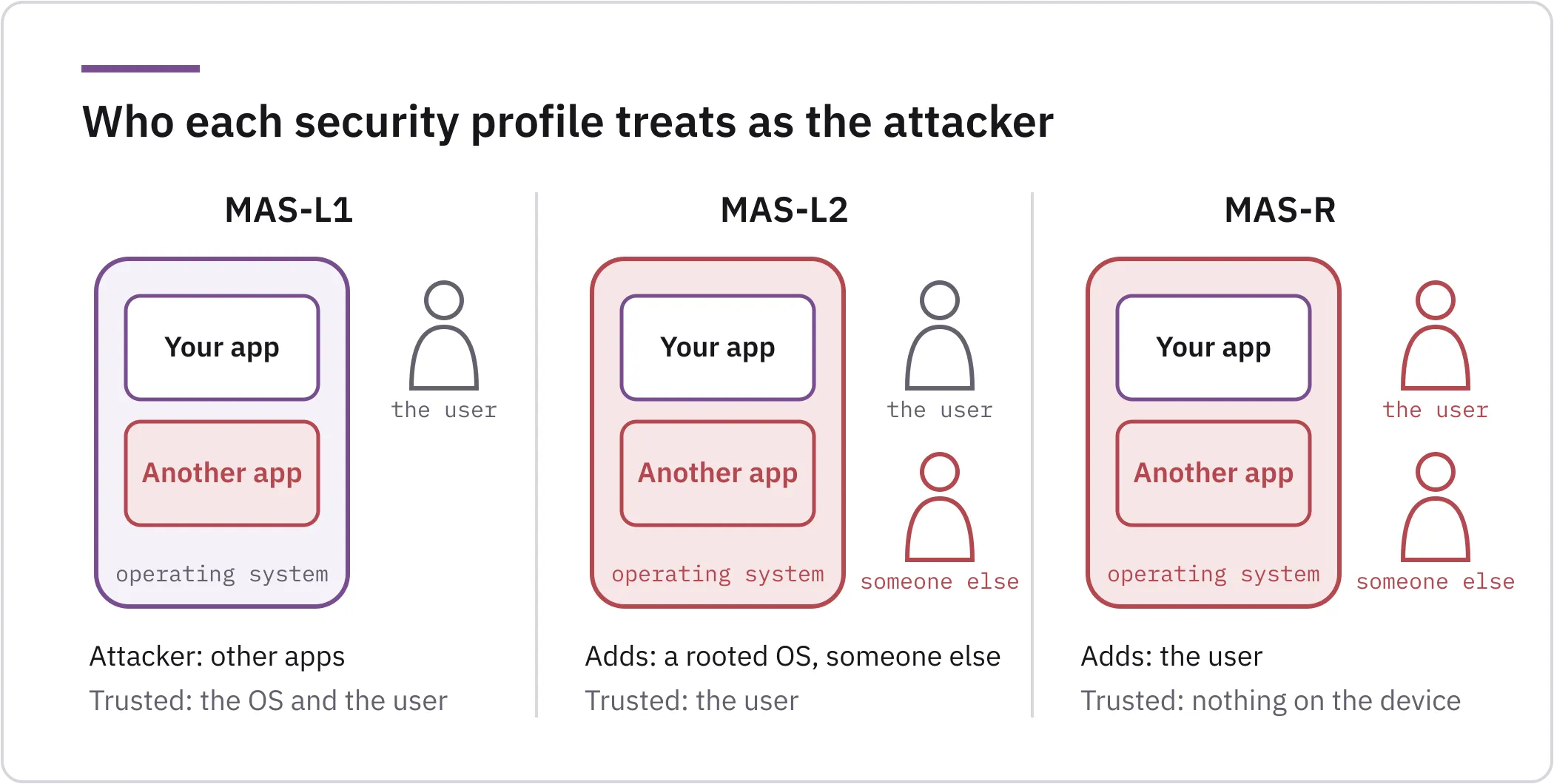
Each of OWASP’s MAS Testing Profiles is defined by what it trusts. MAS-L1, the baseline OWASP recommends for every app, trusts the operating system and the person using the phone, and treats the other installed apps as hostile. So an app that writes a session token to shared storage, where other apps can read it, fails L1 (MASTG-TEST-0200, MASWE-0002).
MAS-L2 stops trusting the operating system. It assumes the phone may be rooted or jailbroken, and that a third party may attack it with or without the phone in hand. The user is still on your side. On a rooted phone, other code can read the app’s private folder. That is why the same token, kept unencrypted inside that folder, is outside L1 and fails L2 in the current mapping (MASTG-TEST-0287, MASWE-0001).
MAS-R adds the user to the list of attackers. It is for apps whose own code and logic are the target of reverse engineers, cheaters, or anyone who wants to repackage the app or skip a licence check.
L2 and R are easy to confuse, because both assume a rooted phone. L2 keeps the user’s data safe on a rooted phone. R makes the app notice the root, the hooks or the emulator and react, because the person who set them up is the attacker.
R adds no storage controls of its own, so it can also sit on top of L1. OWASP’s example is an ad-supported weather app that wants its code protected but holds no data that needs the storage controls of L2.
MAS-P has no attacker. Instead, it checks how the app collects, minimises and shares personal data, and OWASP recommends it for every app that handles user-sensitive data.
In the figure, red marks what each security profile treats as hostile on the same phone. R’s attackers include those of L2, even though R’s controls can sit on top of L1.
Which tests does each profile add?
A profile is now a list of MASWE weaknesses, each with the MASTG tests that check it. In MASWE v1.0.0, L2 holds every weakness of L1 plus 21 more:
| Profile | Weaknesses |
|---|---|
| L1 | 29 |
| L2 | The 29 of L1, plus 21 more |
| R | 15 |
| P | 13 |
On mas.owasp.org, each profile page shows its weaknesses with the number of tests behind each one, and some weaknesses have no test yet.
In MASTG v2.0.0, every test still carried its own profile tag. Then, on 17 September 2026, OWASP removed those tags so that tests inherit the profile of their weakness, which is what the badges on each test page show today. As a result, MASTG-TEST-0287, the test for unencrypted data in Android’s SharedPreferences, was L1 and L2 in v2.0.0 and is L2 only today, because the weakness it checks, MASWE-0001, is an L2 weakness. A report that does not name its MASTG and MASWE versions cannot tell you which profile its tests belonged to.
The tests that only L2 runs target the L2 attacker. Someone between the app and its servers can read the traffic with a certificate the phone trusts, for example one issued by a compromised certificate authority. Pinning stops that, and MASTG-TEST-0242 checks the pins declared in the Android Network Security Configuration (MASVS-NETWORK-2, MASWE-0028). Someone else holding the unlocked phone can open the app switcher, so MASTG-TEST-0289 checks that Android’s screenshot of the app hides sensitive content (MASWE-0038). That same person may have watched the user type the device PIN, which is why MASTG-TEST-0326 looks in the code for biometric prompts that accept the PIN, pattern or password for a sensitive action (MASWE-0021). An L1 report leaves these three tests out by design.
Which tests run also depends on the kind of report you agree with the tester. In a MASVS assessment, I run the tests of each agreed profile. In an open pentest, I map each finding to the MASTG test behind it when one exists, which tells you what was found but not which profile the app meets.
The profile a test belongs to and the attacker who can exploit the finding do not always match. For example, in October 2026 we analysed a consumer app that wrote user credentials and session tokens to the system log. That weakness sits under both L1 and L2 (MASWE-0005, MASTG-TEST-0203), so the app fails the logging test and meets neither profile. Part of the reason is in the test itself: since Android 4.1, only privileged system apps with the READ_LOGS permission can read the log, and some phones ship preinstalled apps that hold that permission. Anyone with root or with debugging access can read the whole log too. Privileged apps that hold READ_LOGS fit the L1 attacker, and root or debugging access fits the L2 attacker, so the severity depends on which of them your users face. I report the finding where MASWE puts it, and I rate its severity by who can actually read the log on the phones your app supports. We rate findings that way, with CVSS 4.0, in Darío Abad’s mobile pentest findings: which are real and what to fix first.
How do you choose the profile for your app?
OWASP recommends a custom profile built from your threat model, and offers the four default profiles to teams that cannot build one. Its examples for the defaults, which OWASP calls illustrative, sit on a two-by-two grid. On that grid, moderate or high-risk data, such as payment details, together with sensitive functionality, such as medical record uploads or in-app purchases, move an app from L1 to L2. Business assets or logic worth protecting, such as intellectual property or ad revenue, add R. P goes in all four cells. So a news app that holds only a name and an email lands on L1+P, and a banking app on L2+P+R:
| Without business assets worth protecting | With business assets or logic worth protecting | |
|---|---|---|
| Low-risk data and functionality | L1+P, for example a news app that holds only a name and an email | L1+P+R |
| Moderate or high-risk data and sensitive functionality | L2+P | L2+P+R, for example a banking app |
The profile does not have to be the same for the whole app. An app whose high-risk data never leaves the phone, for example, can take L2 for the storage tests and L1 for the network tests (OWASP’s guide on using MAS profiles). The same guide states that “the goal is not to comply with every profile or every test within a profile”, and that tests for features the app lacks do not apply.
A higher profile has costs, and OWASP lists them: development effort, users locked out or slowed down, and security features that collect personal data of their own, such as a phone number for SMS codes. The choice should therefore be made “in consultation with business owners”, with each deviation justified and documented (MASVS).
For EU Digital Identity Wallets, OWASP recommends a specialised profile, MAS-EUDIW. It takes most controls of the four default profiles and adds requirements for assets that only a wallet has, such as the wallet instance attestation. The Netherlands is integrating MAS-EUDIW into its national EUDI wallet certification scheme, according to the MAS-EUDIW profile page.
If the Cyber Resilience Act (CRA) applies to your app, the profile also feeds your risk assessment and your technical documentation, as Javier Tallón shows feature by feature in his guide to OWASP MASTG for CRA compliance.
What can MAS-R protect in an app without payments?
In my view, R pays off when you want to make it harder for someone to understand what the app does or what it sends and receives, to distribute modified copies of it, or to run it from botted environments, and none of those needs money in the app.
Traffic to your backend is one case. Pinning keeps someone between the app and its servers from reading that traffic with a certificate the phone trusts. But anyone who controls the phone, the user included, can hook the app at runtime and switch pinning off, and detecting those hooks is an R control (MASTG-TEST-0341, MASWE-0058). R also lists encryption of the payload at the application level (MASWE-0062), which has no MASTG test yet. Hook detection and payload encryption together raise the cost of reading that traffic, but a patient attacker with the phone gets through, so the API still has to treat every request as untrusted.
Logic you want to keep is the other case, for example a small classifier or scoring algorithm written in the app’s own code. Anyone can decompile that code, so obfuscation is the R measure to start with (MASVS-RESILIENCE-3, MASWE-0059). MASTG-TEST-0368 checks obfuscation for Java and Kotlin, and the test’s own example is a fintech app’s fraud-scoring logic. If your classifier ships as a model file instead of code, the weakness is resource obfuscation (MASWE-0060), which has no MASTG test yet.
OWASP is explicit about the limits of R. Missing R measures do not create a vulnerability, R adds to L1 or L2 instead of replacing them, and an attacker with the device and enough time gets through.
What does passing a MAS-R test prove?
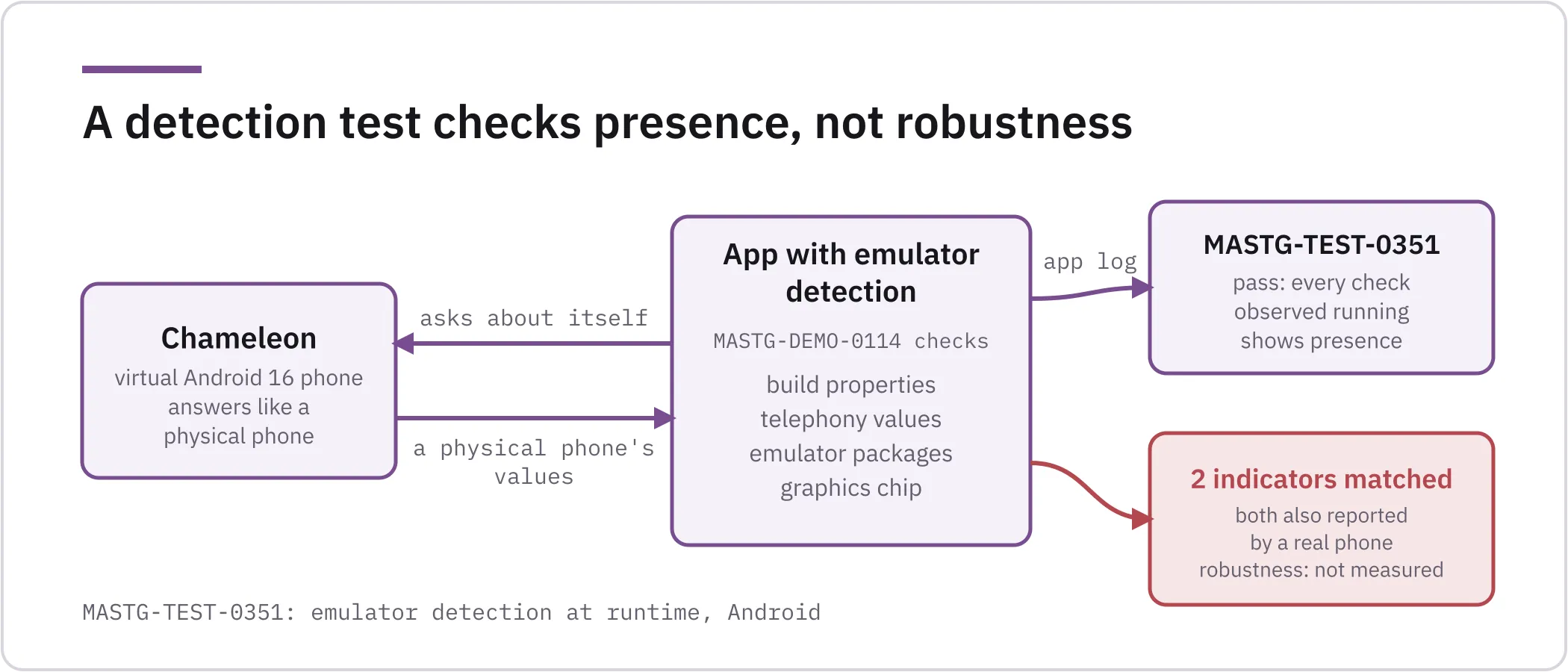
Sergio García and I ported several resilience tests from MASTG v1 to v2. The v2.0.0 release notes count 17 new tests and 16 runnable demos from that work, and mine include emulator detection and obfuscation. MASTG-TEST-0351, the Android test for emulator detection at runtime, fails “if no instances of emulator detection checks are observed”. The same test adds that results “should be interpreted as evidence of the presence of emulator detection logic, not as an assessment of its robustness or effectiveness”. The root and debugger detection tests are written the same way. A pass on a detection test shows that the app applies the mechanism, and says nothing about whether it holds against someone trying to bypass it.
I wrote the demo app for that test, MASTG-DEMO-0114, which checks build properties, telephony values, emulator packages and the graphics chip. On 22 October 2026 we ran it on Chameleon, our virtual Android 16 phone. The app’s own log shows every check running, which is what MASTG-TEST-0351 looks for. The log also shows what the app was told: the build fingerprint, model, mobile operator and graphics chip of a physical phone. Its summary line read:
Indicators matched in this run: Build.SERIAL=unknown, Build.USER=android-buildBoth values are also what a real phone of that model reports to an app, so they say nothing about an emulator. We used no bypass hook, because Chameleon is built to answer like a physical phone. Against a device like that, the app can only do its best with the checks it has, and that effort is what MASTG-TEST-0351 measures. So the run passes the test on presence and leaves robustness unmeasured:
The tests still lack a clear line for when to accept that, for example, the app detects root. Presence can be checked the same way on every app, but robustness depends on the skill, the experience and the time of whoever tries to break it, so it is a judgement. The obfuscation test already asks for that judgement, since MASTG-TEST-0368 fails if an attacker can reverse engineer security-relevant logic “with reasonable effort”.
My view is that detection needs levels too, each with its own pass criterion. A basic level would cover checks that ask the device about itself, such as build properties, files, installed packages or telephony values. Whoever controls the device controls those answers, as the run above shows. Native checks are harder to reach than Java ones, but they still ask the device about itself. An advanced level would rely on evidence the device cannot make up on its own, such as a hardware-backed attestation verdict that your server verifies. Until then, if your customer needs to know whether the protections hold, someone has to try to bypass them.
Which profile fits each kind of app?
Use this table as a first draft of your threat model. Each row starts from what the app has, then gives the attacker, the profiles and one test or weakness the choice brings in. Rows 1, 2, 4 and 5 follow OWASP’s examples, row 7 is OWASP’s specialised profile, and the classifier in row 2 and rows 3 and 6 are my reading.
| If your app… | You are defending against | Start from | A test it brings in |
|---|---|---|---|
| Shows content, with an account that holds a name and an email | Other apps on the phone | L1+P | MASTG-TEST-0200: files written to shared storage |
| Earns from ads, or runs logic you want to keep, such as a classifier in its own code, with low-risk data | The user, decompiling the app | L1+P+R | MASWE-0059: code obfuscation not implemented |
| Sends traffic to an API that you want to be hard to read | Someone on the network, then whoever controls the phone | L2+P for pinning, plus R for hook detection | MASTG-TEST-0242 and MASTG-TEST-0341: pinning, and detection of runtime hooks |
| Handles high-risk data such as health records, location or payment details, with sensitive functions such as medical record uploads | A rooted phone, someone else holding it | L2+P | MASTG-TEST-0287: unencrypted data in the app’s private storage |
| Moves money or sells in-app purchases while protecting its own logic, like banking, insurance or game apps | All of the above, and the user | L2+P+R | MASTG-TEST-0325: root detection at runtime |
| Is abused by modified copies or by bots on emulators | The user, at scale | Add R to your base profile | MASTG-TEST-0351: emulator detection at runtime |
| Is an EU Digital Identity Wallet | Attackers with high attack potential | MAS-EUDIW | The profile’s own requirements catalogue |
The table links the Android tests. For iOS, each weakness page in MASWE lists the tests for the same weakness, where there are any.
What can you claim after a MASVS assessment?
Nobody gets a MASVS certificate from OWASP, because OWASP “does not certify any vendors, verifiers or software”. It also warns anyone who relies on a trust mark that claims MASVS certification (Assessment and Certification). Where a certification scheme does exist, a laboratory evaluates and the scheme owner certifies, and OWASP plays neither role for MASVS. vulnit evaluates and never certifies.
What you can claim is that the app meets a profile. I accept “meets MAS-L1” when every L1 test that applies to the app has passed and every L1 weakness without a test has been assessed another way. I would not accept it if only four L1 tests had been run. The second condition matters because on 24 October 2026, 11 of the 29 weaknesses on the MAS-L1 page had no MASTG test. One of them is MASWE-0004, sensitive data such as an API key hardcoded in the app package. Those weaknesses are assessed starting from the ways MASWE says each one gets introduced, as the profile page describes, and the report should say how each one was checked.
That level of detail is what MASVS asks of any report from a certifying organisation: it should state the scope and the tests passed and failed. MASVS also warns that “it is not sufficient to simply run a tool”.
A line your team can paste into a customer questionnaire looks like this:
Version 4.2.0 of the Android app was assessed on 26 October 2026 against profiles MAS-L1 and MAS-P, using OWASP MASVS v2.1.0, MASWE v1.0.0 and the MASTG tests at commit 2eb0f70 of 24 October 2026. All applicable tests passed. Weaknesses without a MASTG test were assessed as described in the report, and tests for features absent from the app were marked not applicable.
The line covers version 4.2.0 only, so for the next release a retest checks what failed and whatever the changes may have affected.
When should you combine a MASVS assessment with a pentest?
A MASVS assessment and a pentest answer different questions. In my view, the assessment is quicker to run because its tests are standard procedures rather than attack paths designed for your app, and its results reuse well in profiles built on MAS, such as MAS-EUDIW, which shares most of its controls. An assessment suits a customer or regulator who asks for a standard by name. A pentest, instead, follows the attack paths of your app in particular. It reaches further into your app’s own logic, and it takes longer.
The biggest difference is the API. The assessment stops at the app: MASVS “only covers the security of the mobile app (client-side)” and points to the Application Security Verification Standard (ASVS) for the backend. The MASTG does not test remote endpoints either, and points to the Web Security Testing Guide (WSTG). Yet to check whether the app uses its API correctly, or whether the server enforces what the app assumes, you have to send requests to the server. An app that only shows you your own orders proves nothing if the endpoint returns anyone’s order to whoever asks, and no MASTG test would catch that. A pentest can put the API in scope, and it usually does, for coverage.
In short, the assessment follows a standard and the pentest follows your app:
| MASVS assessment | Pentest | |
|---|---|---|
| Follows | Standard test procedures | The attack paths of your app |
| Covers | The mobile app, client side | Your app’s own logic in more depth, and the API, which is usually in scope |
| Suits | A customer or regulator who asks for a standard by name | Knowing what an attacker could do to your app and its backend |
Combine them when a third party asks for MASVS and you also need to know what an attacker could do to your app and its backend. In that case, an OWASP MASVS assessment gives you the result for each requirement of the agreed profiles, with its evidence, and a mobile application penetration test adds the attack paths of your app and, if you put it in scope, the API. You can run them as one project, with one analysis of the app feeding both.
Before you ask anyone to test your app, write down who you expect to attack it, feature by feature, and the profile each answer leads to. Bring that list, or the line of your customer’s questionnaire that asks for MASVS, to a scoping call and we will recommend the profile or combination that fits your app. The sample questionnaire line above shows what your answer should name.
References
- MAS Testing Profiles, OWASP
- Using MAS Profiles, OWASP
- MAS-L1, MAS-L2, MAS-R and MAS-P profile pages, OWASP
- MAS-EUDIW: EU Digital Identity Wallet profile, OWASP
- OWASP MASVS v2.1.0, OWASP, 18 January 2024
- MASVS: Using the MASVS, OWASP
- MASVS: Assessment and Certification, OWASP
- OWASP MASTG v2.0.0 release notes, OWASP, 30 June 2026
- MASTG v2.0.0 is here, OWASP
- Remove profiles from MASTG tests, pull request #3979, OWASP, merged 17 September 2026
- OWASP MASWE v1.0.0 release notes, OWASP, 17 August 2026
- MASWE v1.0.0 is here, OWASP
