
From a connected doorbell to Home Assistant: reverse-engineering a Netatmo/BTicino intercom with an AI agent and a virtual phone
A field report on bringing a cloud-locked Legrand/BTicino Home + Security video intercom into Home Assistant: an instrumented mobile session, the OAuth2 protocol read off decrypted TLS, the stateful websocket precondition that actually makes the door open, and the camera's signed snapshot URLs.
I did not choose this doorbell. My building’s homeowners’ association did, in a meeting I half-attended, and my only contribution was asking for the Wi-Fi model because I love walking out of my home without keys and buzzing myself back in from my phone.
What I got was a Legrand/BTicino “Home + Security” video intercom: nice hardware, a slick app, and a camera and a door lock that live entirely in the vendor’s cloud. What I wanted was to open that door from my own Home Assistant dashboard, next to every other thing in my house. There is no official integration for that. So I did what a rusty hacker does on a Saturday afternoon: I treated the app I already had on my own account as a target, and let an instrumented phone and an agent read the protocol for me.
A note before anything else: this was my home, my account, my hardware. Reverse-engineering a device you own to make it interoperate is a very different thing from pointing any of this at someone else’s building. Everything below ran against my own intercom, with my own credentials, on a lab device. I have kept the embedded app secret and a copy-paste “open the door” recipe out of this post on purpose.
The constraint: a good lock with no keyhole for me
The intercom is a BTicino Classe 100X16E indoor panel paired with an outdoor entrance panel and a door-release module. In the app it shows up as a small family of devices (an entrance panel with the camera, a door lock and a staircase light), all hanging off the indoor unit, which acts as the bridge to the cloud.
Everything routes through Netatmo’s backend. The Android app (com.netatmo.camera, branded “Security”, the one Legrand and BTicino ship for these panels) talks to a cloud API; the door opens because the app asks the cloud to ask the panel. There is no local API, no documented way in, and no Home Assistant integration that covers this hardware. For a device whose entire selling point is “open your door from your phone”, the door was, for me, firmly shut.
So the question was the same one I always end up at: how does the app itself do it, and can I speak that language from my own code?
The plan: become the app, under instrumentation
A confession first: I have always been more of a hardware person. My first instinct was the twenty-year-old one, crack the panel open, pull its firmware, jailbreak it and own it from the inside, and I had a weekend pencilled in for exactly that. But I am part of the vulnit team now, and the team instinct is different and far cheaper: do not fight the hardware, go after the app the phone already talks to all day.
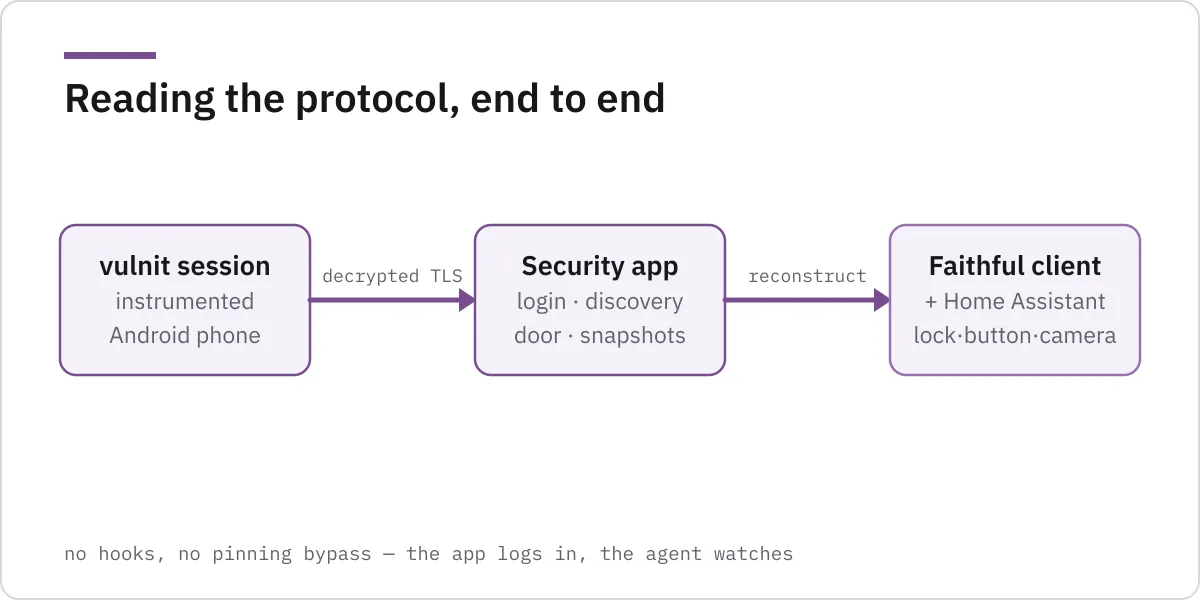
And going after the app no longer means a weekend of Frida scripts, certificate-pinning bypasses and cold coffee. I did not reach for any of it. The plan was simpler:
- Stand up a Chameleon instrumented mobile session: a real Android environment where the app’s decrypted TLS is visible, with no hooks to write.
- Install the “Security” app from the Play Store and sign in to my own account.
- Open the live view and slide to unlock, then read the traffic the app generated.
- Turn that into a faithful client, then into a Home Assistant integration.
The whole trick is step 1. On an ordinary phone, all of this is TLS you cannot read, from an app that does not want you reading it. An instrumented session turns “encrypted bytes on the wire” into “the exact request the app sent”, which is the difference between guessing and knowing. I did not write a single hook. I logged in, and the agent watched.
Reading the protocol off the wire
A single login produced about fifty decrypted TLS records, and the shape of the whole API fell out of them.
Authentication is a textbook OAuth2 password grant to app.netatmo.net:
POST /oauth2/token HTTP/2
Host: app.netatmo.net
user-agent: NetatmoApp(Security/v26.9.1.0/500000026) Android(16/Google/Pixel 7)
content-type: application/x-www-form-urlencoded

grant_type=password&username=<me>&password=<redacted>
&client_id=na_client_android_welcome&client_secret=<redacted>
&scope=security_scopes&app_version=26.9.1.0
The response is an ordinary token pair (access_token, refresh_token, expires_in of three hours), and from there every call is a Bearer request. The client_id and client_secret identify the application, not me; they are the same for every install and are a fixed input to the login, not something the server hands back. (That they ship inside the binary is its own conversation; I am deliberately not reprinting the secret here.)
Discovery is two calls. POST /api/homesdata returns the account’s homes and feature flags; POST /syncapi/v1/homestatus returns the live state of every module in a home. Between them, the agent built the device map, anonymised here but structurally exactly what the app sees:
{
  "home": { "id": "<home_id>", "modules": [
    { "id": "<bridge>",   "type": "BNC1", "name": "Classe 100X16E" },
    { "id": "<camera>",   "type": "BNEU", "name": "Entrance Panel", "bridge": "<bridge>" },
    { "id": "<lock>",     "type": "BNDL", "name": "Door Lock",      "bridge": "<bridge>" },
    { "id": "<light>",    "type": "BNSL", "name": "Staircase Light","bridge": "<bridge>" }
  ]}
}
BNDL is the door-release module, bridged through the indoor panel. That was the thing I actually wanted to drive.
The door that would not open
This is the part that makes the case worth writing down, and it is exactly the kind of thing that is not obvious from a static read of an app. It only shows up when you reverse-engineer in a live, dynamic environment.
Opening the door is a setstate call. The app’s “slide to unlock” sends, in essence:
POST /syncapi/v1/setstate HTTP/2
Host: app.netatmo.net
authorization: Bearer <token>

{ "home": { "id": "<home_id>", "modules":
    [ { "bridge": "<bridge>", "id": "<lock>", "lock": false } ] } }
lock: false is “open”. I replayed it from my fresh client, and the server answered 200 OK, with a catch:
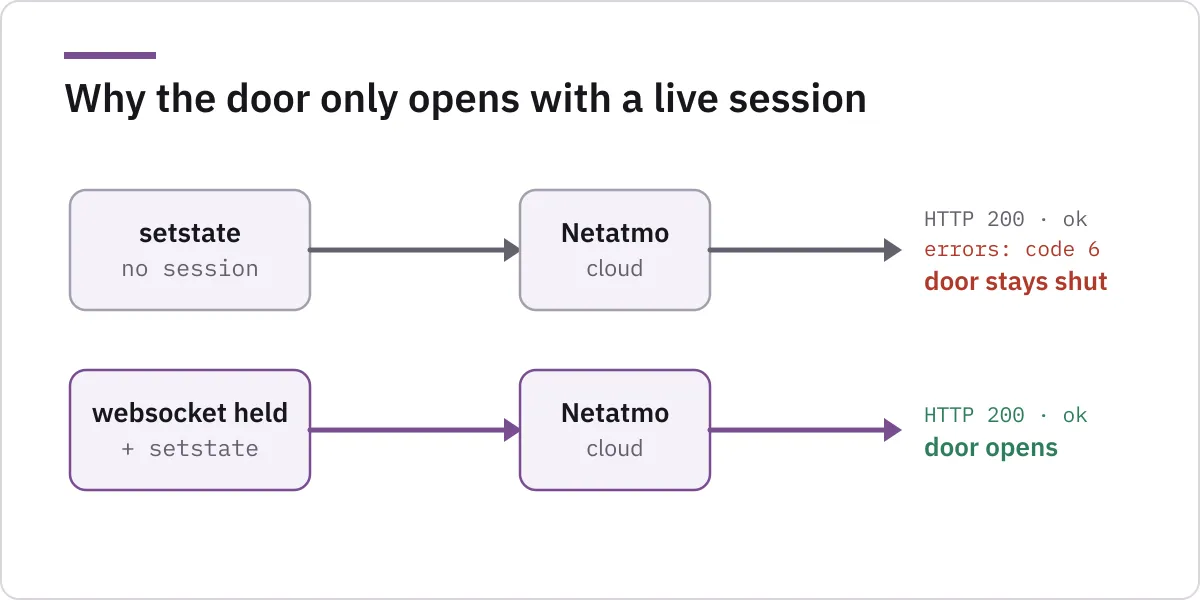
{ "status": "ok", "body": { "errors": [ { "code": 6, "id": "<bridge>" } ] } }status: ok, and yet an error against the bridge, nothing moved when I checked the actual door. Code 6 is “device unreachable”. But the panel was online: homestatus reported it reachable, good Wi-Fi, everything green. The request was well-formed; the server parsed it and addressed the right module. It just quietly refused to relay it.
The missing ingredient was a live realtime session. The app keeps a websocket open to app-ws.netatmo.net for the whole time it is in the foreground, and the cloud only relays a door command to a bridge while such a session is held. Fire the lone HTTP call with no websocket, and you get status: ok plus code 6 and a door that stays shut. Open the websocket first, let it settle, then send the same setstate, and the response changes to a clean:
{ "status": "ok" }and the door swings open. One quirk, a stateful precondition the HTTP API never advertises, was the whole game. A client that only speaks request/response will conclude the command “doesn’t work”; a client that behaves like the real app, holding the session open, succeeds every time. You only find that by driving the thing live and watching it fail, then watching it succeed.

That is also why the app’s own control is the most reliable client there is: it already holds the session. Here is the agent driving the real “Security” app on the instrumented session and sliding to unlock, the exact gesture, captured live:
Pulling frames from the camera
The camera followed the same logic. Timeline events come from POST //api/getevents, and each event carries a pre-signed blob URL (an Azure storage link with a short-lived SAS signature) that the app fetches with no auth header at all:
GET /production/<hash>?sv=2017-11-09&sr=b&se=<expiry>&sig=<signature> HTTP/1.1
Host: netatmocameraimage.blob.core.windows.net
User-Agent: okhttp/5.3.2
Follow the link and you get the JPEG the panel captured. My client pulls the most recent event frame on demand, which is exactly what a Home Assistant camera entity needs. (For obvious reasons, the frames in my test were of my own doorway, and none of them are in this post.)
From protocol to Home Assistant
With login, discovery, the door command and the snapshot path understood, the rest was ordinary engineering. The agent assembled a small, dependency-light client that reproduces the app’s requests faithfully (same host, same user-agent, same body shapes, so the backend cannot tell it apart) and then wrapped it in a Home Assistant integration: a lock to open the door, a button for the same, and a camera for the latest frame.
The one design decision that mattered was carrying the lesson from the door over into the integration: it keeps the realtime session alive and the token refreshed in the background, the way the app does, so the door command has the session it needs. A door that opens only sometimes is worse than no integration at all.
The result is the thing I wanted on a Saturday morning: the intercom’s door and camera sitting in my own dashboard, next to the lights and the thermostat, opening with one tap. No app, no keys.
What I took away
Two things stuck with me, and neither is about Netatmo specifically.
The app’s protocol gave me a way to integrate the intercom. This device had no local API and no integration, and that reads as a wall until you remember that the app has no magic either. It speaks a protocol, and a protocol you can observe is a protocol you can speak. The lock on my interoperability was the opacity of the traffic, and instrumentation dissolves exactly that.
Testing against the panel revealed the live-session requirement. The single most important finding here, that the door relay needs a live session, is invisible to any amount of static analysis. It only exists while the system is running, and you only catch it by operating the real thing and watching a well-formed request fail. Reverse engineering in dynamic environments is where the non-obvious answers are, and it is precisely the part that used to be slow and finicky and is now, with the right platform and an agent, an afternoon.
Where vulnit fits
I did not build anything special for this. The hard part, running inside an app that resists inspection and getting a clean view of what it actually sends and receives, without hand-writing a single hook, is the ground vulnit stands on for mobile security testing.
That is the capability worth naming: not “we can read some traffic”, but that an instrumented session behaves like a real device running a real, store-distributed app, and still hands an analyst (or an agent) the decrypted protocol. Put an agent on top of it and a job that used to be a specialist’s weekend of hooks and pinning bypasses becomes a supervised conversation: log in, map the devices, find the one stateful precondition that makes the door move, and hand back a working client. That is the direction we are building at vulnit: agent-driven mobile reverse engineering that can stand on real ground and turn an app’s behaviour into something a team can act on.
If that is the kind of capability you want pointed at your own mobile apps, you can request early access.
A note on responsible use
This is owner-driven interoperability: my home, my account, my hardware, reverse-engineered so I could use what I already paid for. The same steps against a building that is not yours are simply an attack, and no framing changes that. I have kept the application’s embedded secret and a ready-to-run door opener out of this write-up deliberately. The value is in understanding how dynamic reverse engineering surfaces a precondition like the live-session requirement, not in a recipe for operating someone else’s front door.
References