
Escaping Authy: recovering 46 TOTP secrets from a walled-garden authenticator
A field report on migrating every second factor out of Authy: an instrumented mobile session that reads the app's TLS in cleartext with no hooks, the Play Integrity wall and the leaked-keybox game behind it, and decrypting the seed sync into portable otpauth:// URIs. The decryptor is published in full.
Most people never think about their authenticator app until the day they want to leave it. Then they find out that the six-digit codes guarding their email, their bank, and their work accounts are much easier to put in than to take out.
This is a field report from one of those migrations. One of us had spent years with every second factor locked inside Authy: 46 accounts, from personal email to banking to company infrastructure. Authy has no export button. The seeds that generate those codes live on Twilio’s servers, encrypted, and the app is built to keep them there.
So we did what we do: we treated our own authenticator as a mobile security target, stood up an instrumented session, and recovered the seeds the same way the app does. This post walks through how we did it, where it got interesting, and what it says about owning your second factor. The decryption script is published in full at the end.
One note before anything else: this only works on an account you control. The whole procedure is gated on the account’s own phone number and its backup password. That gate is the line between data portability and an attack. Everything below ran against our own account, with our own credentials. Treat the recovered seeds the way you would treat a private key.
The constraint: there is no export
A TOTP seed is a shared secret. The service gives it to you once, usually as a QR code, and from then on both sides derive the same rolling six-digit code from that seed and the current time. Whoever holds the seed can generate valid codes forever. That is why an authenticator holding dozens of them is such a high-value target, and why “just export them” is not a button vendors rush to ship.
Authy is the sharp end of this. Seeds are stored server-side and synced to the app encrypted under a key derived from your backup password. There is no “show seed” and no bulk export. If you want out, the supported answer is to add each account again by hand, from scratch, at every service, assuming each service even lets you re-enroll without a support ticket.
For 46 accounts, that is not a migration, it is a week of evenings. So we looked at how the app gets the seeds in the first place.
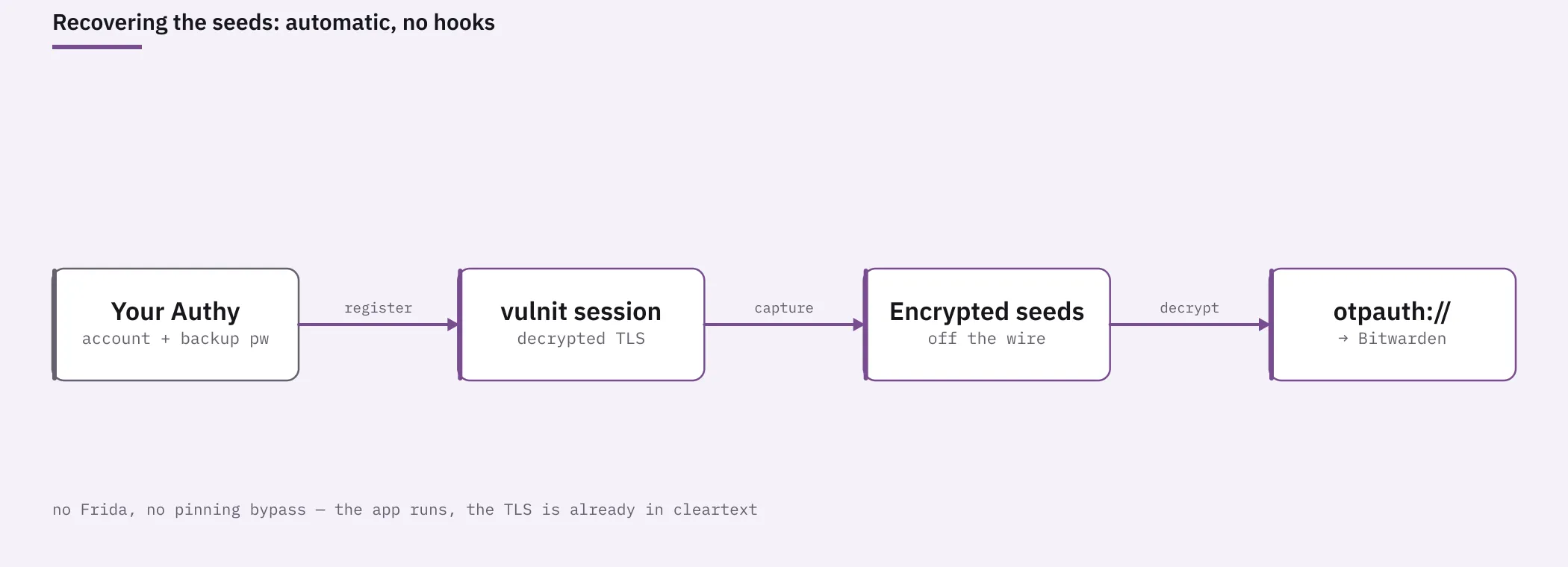
The plan: become a new device, under instrumentation
Authy’s own clients get the seeds by registering as a device on the account and syncing. That sync is exactly the data we wanted: the encrypted seeds, delivered over TLS to a client we would control.
The approach:
- Stand up a Chameleon instrumented mobile session: a real Android environment where the app’s TLS traffic is captured and decrypted for us.
- Get the genuine Authy binary onto it, and register the session as a new device on our account.
- Let it sync, and capture the encrypted seed blob off the wire.
- Decrypt locally with the backup password into standard
otpauth://URIs. - Import those into Bitwarden.
Getting the app onto the device: sideload, the clean way
Before any of that, the genuine app has to be on the device, and that is the first place the walled garden pushes back.
The obvious route is signing into a Google account and installing from the Play Store. We avoid that. It ties the session to a personal Google identity, the kind of credential you do not want to spread across disposable test environments. Instead we sideload, but with the real Play-distributed binary rather than a random mirror.
To do that, we use a tool called [goopdl](https://github.com/Villoh/goopdl). You just give it a package name, com.authy.authy, and it returns the exact bytes Google would have served to a phone. You then install them in the session as split APKs. The downside of this approach is that Aurora Store’s public dispenser is often rate-limited. This can be solved maintaining your private dispenser with your own accounts (which is what we have in vulnit).
Sideloading a genuine binary this way is fast and reproducible, but it runs into the second half of the integrity story below: Play Integrity cares not only which binary ran but how it was installed. Handling that install-source signal is part of what the platform does for you, and not something we spell out as a copy-paste recipe here.
The real wall: device integrity, and the leaked-keybox game
The first registration attempt failed in a useful way. The device-token call that bootstraps registration:
POST /json/devices/access_tokens/fetch?device_app=authy&api_key=... HTTP/1.1
Host: api.authy.com
came back with:
HTTP/1.1 403 Forbidden
{
  "success": false,
  "message": "The device, app do not meet the minimum integrity requirements",
  "error_code": "60000"
}
In the app, the same rejection surfaces as a toast on the sign-in screen. (The phone number is redacted.)
![Authy’s sign-in screen with a red error banner reading “[403] The device, app do not meet the minimum integrity requirements”, shown over the country-code and phone-number fields.](/_astro/escaping-authy-integrity-403.h38cW0lY_Z1erxPt.webp)
That request carries a Google Play Integrity verdict, which Authy evaluates server-side. The verdict has layered components, and the common assumption (that it only checks whether the app is genuine and came from Play) misses the hard part. The hard part is device integrity: a claim, backed by the device’s hardware-protected keystore, that this is a genuine, Google-certified Android device.
Our virtual device is not Google-certified. A factory device ships with an attestation keybox: private keys, signed by Google, burned into a hardware-backed keystore. A virtual image does not have one. To produce a passing device-integrity verdict, its keystore has to be backed by a keybox that Google’s roots still vouch for.
These keyboxes leak. There is a small gray market in keyboxes extracted from real hardware (on the order of tens of euros), and a virtual device whose keystore is seeded with one will pass device integrity for a while. “For a while” is the catch: Google continuously identifies and revokes leaked keyboxes. Once a keybox is burned, every device leaning on it drops back to a failing verdict. That is why, when we re-ran this capture weeks later on two different images, both came back 403 / 60000. Nothing had broken in our tooling; the keyboxes underneath had been revoked. It is a treadmill, not a stable state.
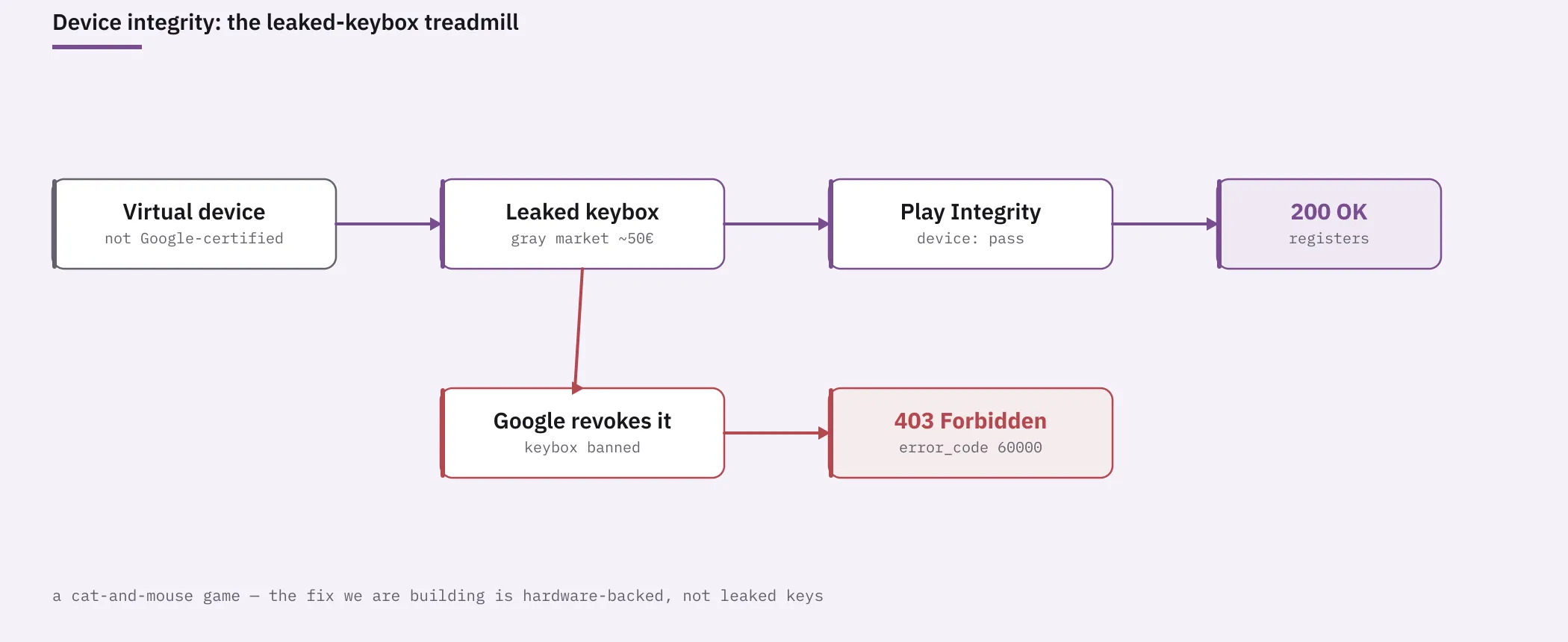
In short: satisfying app integrity (a genuine, properly installed Play binary) is the tractable half. Satisfying device integrity on virtualized hardware currently means renting trust from leaked keys, and that trust has a short, unpredictable shelf life.
One more wall: repeated registration attempts against the same number earn a 429 with error_code 60003 (“account suspended: too many attempts”) and a retry-after that is usually around twelve hours. Authy rate-limits the number, not the device, so brute-forcing the flow is self-defeating. Get the environment right first, then register once.
What comes after leaks
Borrowed keyboxes are a game you can only win temporarily, so the direction we are building toward does not depend on leaks at all.
The idea: instead of impersonating a certified TEE with borrowed keys, forward attestation to a real one. A physical device with a genuine, un-revoked keystore backs the virtual session’s integrity requests continuously, so the verdict the server sees is produced by real certified hardware, because it genuinely is. No gray-market keybox, nothing for Google to revoke, no treadmill. It is harder to build and operate, and it only gets more worthwhile as newer Android releases move factory keyboxes toward ephemeral, remotely provisioned keys and shorten the life of a leaked one further. More on that when it is ready.
Registering the device and triggering the sync
With a genuine Authy binary on a session that passes integrity, registration is ordinary. Enter the country code and number, accept the terms, and confirm. Authy then wants proof that you own the account, with two paths:
- Use Authy on another device. A push to an existing device, approved there; this is what you get when the account already has at least one device.
- Can’t access an existing device? An SMS or voice code to the account’s number.
We approved from an existing device. Authy granted the new device, pulled the account down, and showed the familiar list, every entry labelled “Encrypted token” because the app had the ciphertext but not yet the backup password to unlock it in the UI.
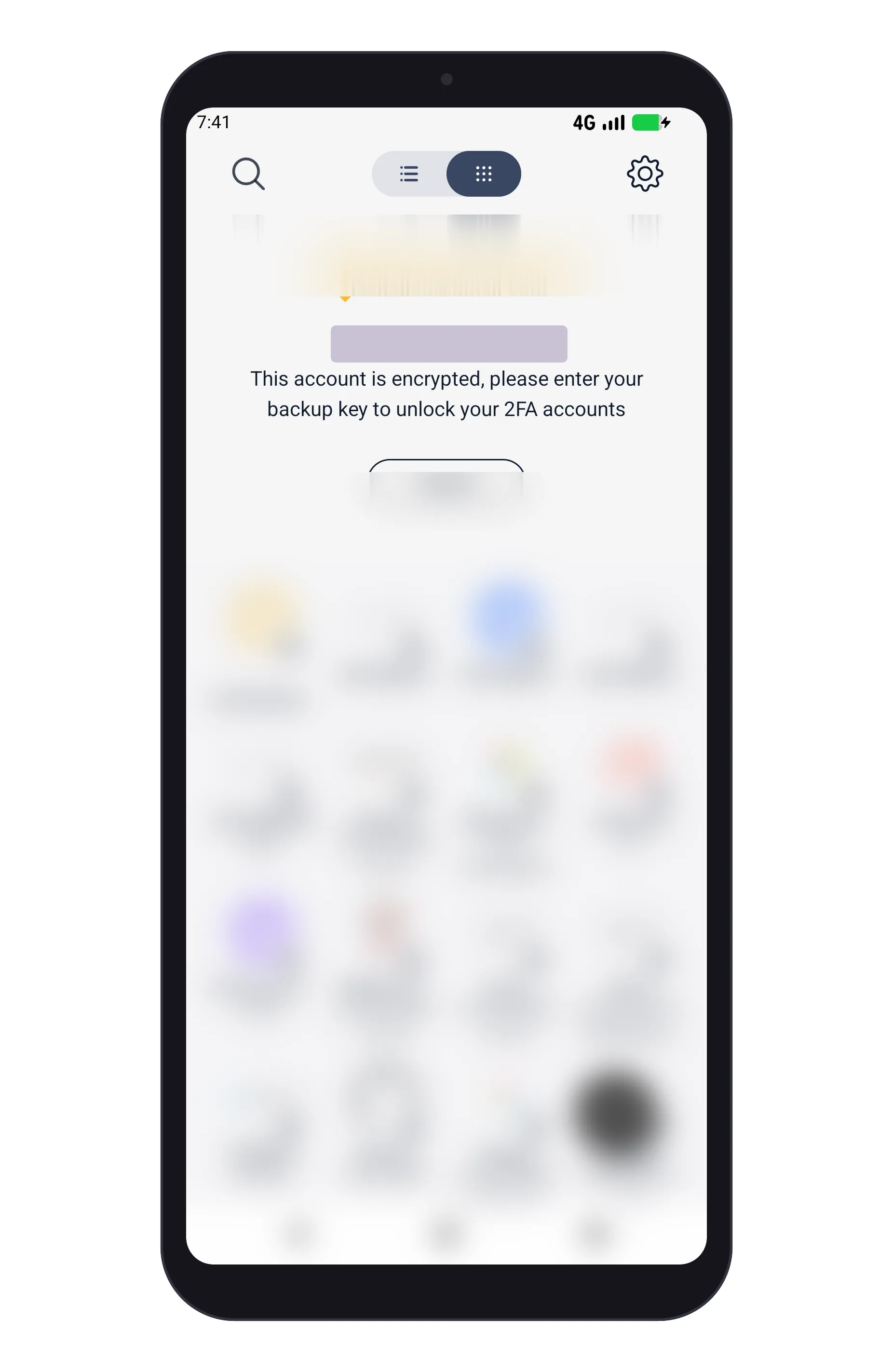
The important part: we did not need to unlock anything in the app. The seeds were already on the wire, in the sync. The UI lock is a client-side convenience, not a server-side gate.
Reading the sync: no hooks, just cleartext TLS
Here is the part worth slowing down on, because it is what made everything else cheap. We did not write a single hook. No Frida scripts, no patched trust store, no certificate-pinning bypass to maintain, no re-signing the APK to make it debuggable. We launched the app under a Chameleon session and the agent handed us the request and response bodies, already decrypted, as the app made them. The TLS Authy relies on to keep its sync private was, from our side, plain JSON.
On an ordinary rooted phone, defeating pinning and getting a clean view of the traffic is the whole afternoon. Here it was not part of the job, which is the only reason the rest (spotting the integrity rejection, finding the token sync, reading the encryption parameters) went quickly.
The sync we cared about was a single call, and we read its body directly:
GET /json/users/<authy_id>/authenticator_tokens?... HTTP/1.1
Host: api.authy.com
Its response is a JSON array of every token on the account. Each entry carries exactly what is needed to reconstruct the secret, and nothing that can be used without the backup password:
{
  "authenticator_tokens": [
    {
      "name": "Example Service",
      "original_name": "Example Service:[email protected]",
      "issuer": "Example",
      "account_type": "example",
      "digits": 6,
      "encrypted_seed": "...base64...",
      "salt": "...32-char ASCII...",
      "unique_iv": "...hex...",
      "key_derivation_iterations": 100000
    }
  ]
}
On our account this came back with 46 entries. One thing that costs people time: Authy often makes this call twice during a sync, once early with an empty array and once with the full set. Grab the full one.
Note what is not here: no plaintext seeds, no backup password, no way to derive codes. The encrypted_seed is ciphertext; salt, unique_iv, and key_derivation_iterations are the public parameters of the encryption. This blob is useless to anyone who does not also hold the account’s backup password, which is why capturing it is portability, not compromise.
Decrypting: PBKDF2, then AES
Authy’s client-side crypto here is straightforward. Each encrypted_seed is AES-256-CBC, under a key derived from the backup password with PBKDF2-HMAC-SHA1:
- key =
PBKDF2-HMAC-SHA1(backup_password, salt, key_derivation_iterations, dkLen = 32), withsaltused as its ASCII-string bytes - IV =
unique_iv(hex-decoded) - plaintext = the TOTP secret, as a base32 (occasionally hex) string
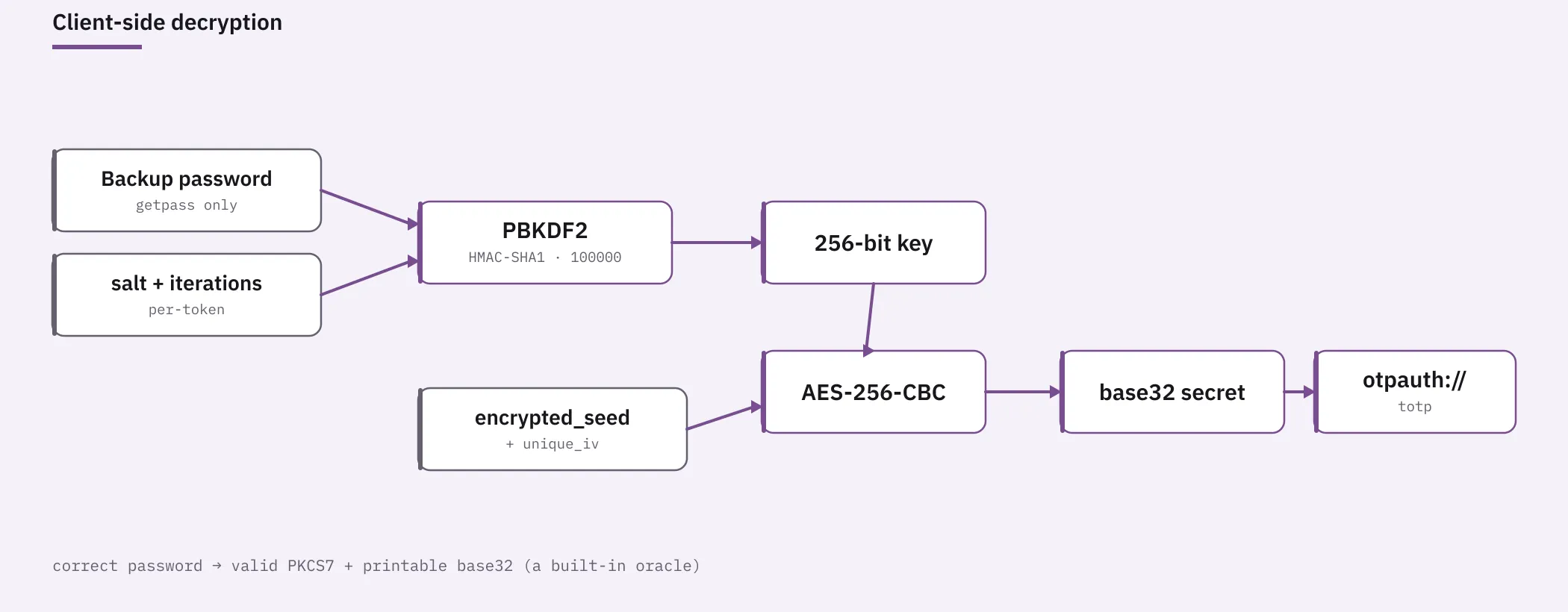
The backup password never leaves the owner’s hands: the decryptor reads it from getpass, never from an argument or an environment variable, and writes no secret to the terminal. The format gives you a free correctness check. A correct decryption produces valid PKCS7 padding and a printable base32/hex string, while a wrong password produces neither with overwhelming probability. So you know immediately whether the password was right, per token, without comparing against a live code.
The output is one standard otpauth:// URI per account:
otpauth://totp/Example:[email protected]?secret=<BASE32>&digits=6&period=30&algorithm=SHA1&issuer=ExampleA few wrinkles showed up across the 46:
- Most seeds are base32 and convert directly. A couple decrypt to hex instead; those are converted to base32 (unambiguously, since hex uses
0/1/8/9, which do not exist in the base32 alphabet). - If every token fails to decrypt, the backup password is wrong. If only some fail, those were encrypted under an older backup password that Authy never re-encrypted, an artifact of how long the account had been around.
The decryptor, in full
There is nothing secret in the method, so here is the whole script. It takes the captured authenticator_tokens JSON and your backup password (read only from getpass/stdin), self-validates each decrypt, and writes otpauth:// URIs to a mode-0600 file. It prints only OK/FAIL per service, never a seed. Run --selftest first to confirm the crypto round-trips on forged data before you trust it with real tokens.
Show the full decryptor (authy_decrypt.py, ~215 lines)
#!/usr/bin/env python3
"""
Authy authenticator_tokens -> otpauth:// migrator.

Decrypts the per-token `encrypted_seed` using YOUR Authy backup password
(PBKDF2 + AES-256-CBC) and emits otpauth:// URIs for import into any
standard authenticator (Google Authenticator, Aegis, 2FAS, Bitwarden, ...).

Secret hygiene:
- The backup password is read from stdin (or getpass), never argv/env.
- Decrypted secrets and otpauth URIs are written ONLY to the output file
  (created mode 0600). Nothing secret is printed to stdout/stderr.
- stdout shows only per-token OK/FAIL by service name, and a final count.

Usage:
    python3 authy_decrypt.py authy_tokens.json otpauth.txt
    # then paste/enter the backup password at the prompt

Self-test (no real data):
    python3 authy_decrypt.py --selftest
"""
import sys, os, json, base64, hashlib, hmac, getpass, urllib.parse, binascii

from Crypto.Cipher import AES  # pycryptodome


def pbkdf2(pw: bytes, salt: bytes, iters: int, dklen: int = 32) -> bytes:
    return hashlib.pbkdf2_hmac("sha1", pw, salt, iters, dklen)


def pkcs7_unpad(b: bytes):
    if not b or len(b) % 16 != 0:
        return None
    p = b[-1]
    if p < 1 or p > 16 or b[-p:] != bytes([p]) * p:
        return None
    return b[:-p]


import re

_B32_RE = re.compile(r"[A-Za-z2-7]+=*\Z")
_HEX_RE = re.compile(r"[0-9a-fA-F]+\Z")


def classify(b: bytes):
    """Classify a decrypted plaintext. Returns (kind, secret_b32) or None.

    kind: 'base32' (direct), 'hex' (converted hex->base32), 'ascii' (printable,
    unknown encoding -> passed through as-is for manual review).
    A correct AES-CBC decrypt with the right key yields valid PKCS7 padding and
    printable ASCII; a wrong key yields random bytes that almost never do both.
    """
    s = b.strip()
    if len(s) < 8:
        return None
    try:
        t = s.decode("ascii")
    except Exception:
        return None
    if not all(32 <= ord(c) < 127 for c in t):
        return None
    if _B32_RE.match(t):
        return ("base32", t.upper().rstrip("="))
    if _HEX_RE.match(t) and len(t) % 2 == 0:
        return ("hex", base64.b32encode(bytes.fromhex(t)).decode().rstrip("="))
    return ("ascii", t)


def hexmaybe(s: str):
    """Return bytes if s is valid hex of even length, else None."""
    try:
        if len(s) % 2 == 0 and all(c in "0123456789abcdefABCDEF" for c in s):
            return bytes.fromhex(s)
    except Exception:
        pass
    return None


def decrypt_seed(token: dict, password: bytes):
    """Try known Authy schemes; return (secret_b32, kind, scheme_tag) or (None, None, None)."""
    enc = base64.b64decode(token["encrypted_seed"])
    salt_str = token["salt"]
    iters = int(token.get("key_derivation_iterations", 1000))
    uiv = token.get("unique_iv") or ""

    # candidate salts: ASCII string bytes (Authy default), and hex-decoded
    salt_cands = [("salt=ascii", salt_str.encode())]
    hb = hexmaybe(salt_str)
    if hb is not None:
        salt_cands.append(("salt=hex", hb))

    # candidate IVs
    iv_cands = []
    ivb = hexmaybe(uiv)
    if ivb is not None and len(ivb) == 16:
        iv_cands.append(("iv=unique", ivb))
    iv_cands.append(("iv=zero", b"\x00" * 16))

    if len(enc) % 16 != 0:
        return None, None, None
    for s_tag, salt in salt_cands:
        key = pbkdf2(password, salt, iters, 32)
        for iv_tag, iv in iv_cands:
            try:
                pt = AES.new(key, AES.MODE_CBC, iv).decrypt(enc)
            except Exception:
                continue
            un = pkcs7_unpad(pt)
            if un is None:
                continue  # invalid padding => wrong key/scheme
            c = classify(un)
            if c is not None:
                return c[1], c[0], f"{s_tag},{iv_tag}"
    return None, None, None


def build_otpauth(token: dict, secret_b32: str) -> str:
    issuer = token.get("issuer") or ""
    name = token.get("original_name") or token.get("name") or "Authy"
    label = f"{issuer}:{name}" if issuer else name
    label = urllib.parse.quote(label, safe="@:")
    q = {
        "secret": secret_b32,
        "digits": str(token.get("digits", 6)),
        "period": "30",
        "algorithm": "SHA1",
    }
    if issuer:
        q["issuer"] = issuer
    return "otpauth://totp/" + label + "?" + urllib.parse.urlencode(q)


def run(infile: str, outfile: str):
    data = json.load(open(infile))
    toks = data["authenticator_tokens"] if isinstance(data, dict) else data
    if sys.stdin.isatty():
        pw = getpass.getpass("Authy backup password: ")
    else:
        pw = sys.stdin.readline().rstrip("\n")
    if not pw:
        print("ERROR: empty password", file=sys.stderr)
        return 2
    pwb = pw.encode("utf-8")

    fd = os.open(outfile, os.O_WRONLY | os.O_CREAT | os.O_TRUNC, 0o600)
    ok = fail = 0
    scheme_seen = set()
    kinds = {"base32": 0, "hex": 0, "ascii": 0}
    with os.fdopen(fd, "w") as out:
        for t in toks:
            label = (t.get("issuer") or "") + ":" + (t.get("name") or t.get("original_name") or "?")
            secret, kind, scheme = decrypt_seed(t, pwb)
            if secret:
                note = "" if kind == "base32" else f"  [{kind}: verify this one]"
                out.write(build_otpauth(t, secret) + ("\n" if kind == "base32" else f"   # {kind}\n"))
                ok += 1
                kinds[kind] += 1
                scheme_seen.add(scheme)
                print(f"  OK   {label[:50]}{note}")
            else:
                fail += 1
                print(f"  FAIL {label[:50]}")
    # scrub password reference
    del pwb, pw
    print(f"\nDone: {ok} decrypted, {fail} failed -> {outfile}")
    print("formats:", ", ".join(f"{k}={v}" for k, v in kinds.items() if v))
    if scheme_seen:
        print("scheme(s) used:", ", ".join(sorted(scheme_seen)))
    if kinds["hex"] or kinds["ascii"]:
        print("NOTE: non-base32 seeds are marked in the file; verify those codes "
              "against Authy before deleting it.", file=sys.stderr)
    if fail and not ok:
        print("All failed: wrong backup password, or unsupported scheme.", file=sys.stderr)
    return 0 if ok and not fail else (1 if fail else 0)


def selftest():
    # Forge a token with the primary scheme and confirm round-trip recovery.
    import os as _os
    secret_b32 = base64.b32encode(_os.urandom(20)).decode().replace("=", "")
    pt = secret_b32.encode()
    pad = 16 - (len(pt) % 16)
    pt = pt + bytes([pad]) * pad
    salt = binascii.hexlify(_os.urandom(16)).decode()  # hex-string salt (ascii-used)
    iters = 1000
    iv = _os.urandom(16)
    key = pbkdf2(b"correct horse", salt.encode(), iters, 32)
    enc = AES.new(key, AES.MODE_CBC, iv).encrypt(pt)
    tok = {
        "encrypted_seed": base64.b64encode(enc).decode(),
        "salt": salt,
        "key_derivation_iterations": iters,
        "unique_iv": binascii.hexlify(iv).decode(),
        "digits": 6,
        "issuer": "Example",
        "original_name": "[email protected]",
    }
    rec, kind, scheme = decrypt_seed(tok, b"correct horse")
    assert rec == secret_b32, f"roundtrip mismatch: {rec} != {secret_b32}"
    bad, _, _ = decrypt_seed(tok, b"wrong password")
    assert bad is None, "wrong password should not decrypt to valid base32"
    uri = build_otpauth(tok, rec)
    assert uri.startswith("otpauth://totp/Example:[email protected]?") and "secret=" in uri
    print("SELFTEST OK (scheme:", scheme, ")")
    return 0


if __name__ == "__main__":
    if len(sys.argv) == 2 and sys.argv[1] == "--selftest":
        sys.exit(selftest())
    if len(sys.argv) != 3:
        print(__doc__)
        sys.exit(2)
    sys.exit(run(sys.argv[1], sys.argv[2]))
Importing into Bitwarden
otpauth:// is the universal interchange format for TOTP, so the destination was a free choice: Aegis, 2FAS, KeePassXC, and Bitwarden all import it. We went with Bitwarden.
This is where the scale of 46 accounts stopped being a crypto problem and became a data-matching one: each recovered secret had to land on the right existing vault item, across a vault with nearly two thousand logins, without clobbering anything or creating duplicates. That is tedious, error-prone work, the kind we increasingly hand to an agent.
An agent drove the last mile: it pulled the vault, matched each otpauth:// to the correct login by issuer and username, attached the TOTP field only where it was confident, flagged the real ambiguities (three identical labels, a service that had quietly been renamed, a couple of accounts that no longer existed), and left those for a human to decide instead of guessing. A job that would have been a long afternoon of manual matching became a supervised conversation.
When it was done, the cleanup mattered as much as the migration: the session lease was destroyed, the captured TLS and the plaintext otpauth:// file were shredded, and the only place the seeds now live is the vault we chose. A decrypted seed is a permanent credential; leaving it in a temp file is worse than not migrating at all.
What this says about your second factor
The technical story is a tidy one: a layered integrity check, a documented crypto scheme, a sync you can read under instrumentation. But the reason it is worth writing down is not the crypto.
Your second factor should not be a hostage. When a product makes it this hard to walk away with your own secrets, that difficulty is a feature for the vendor, not a security property for you. Data portability is not a nice-to-have bolted onto security, it is part of it. Being able to leave is the difference between owning your identity and renting it, and an authenticator with no export quietly puts you in the second camp.
None of this is an argument against strong 2FA, or against Authy’s encryption, which is sound. It is an argument for choosing tools that let you take your seeds with you, and for knowing that when a tool does not, “impossible to leave” usually just means “undocumented”.
Where vulnit fits
We did not build any of this specially. The hard parts, operating inside an app that actively resists inspection, reading its TLS without hooks, and standing up an environment that satisfies a server-side integrity verdict, are the ground vulnit stands on for mobile application security testing.
The capability worth naming: an instrumented session that hands an analyst (or an agent) the app’s decrypted traffic by default, on a device that can clear the integrity bar an app checks server-side. It is the same toolchain we point at clients’ apps on an engagement; the authenticator just happened to be our own. Put an agent on top of it and work that used to be a specialist’s afternoon (register, capture, decrypt, reconcile across a large vault, clean up) becomes repeatable and reviewable.
This is exactly what our mobile application penetration testing service is built on: seeing what an app really sends and receives, finding where the security assumptions break, and turning it into findings a team can act on.
If you want that kind of testing pointed at your own mobile apps, talk to our team.
A note on responsible use
This is owner-driven data portability. It requires the account’s phone number and its backup password, and it recovers only secrets the operator already owns. The same steps run against someone else’s account are simply an attack, and no amount of framing changes that. We ran it against our own account, documented it so others can leave a walled garden they are entitled to leave, and published the decryptor because there is nothing secret in the method. We deliberately kept the operational details of satisfying the device-integrity verdict where they belong: inside the platform, not in a copy-paste recipe.
References